An offline store is the durable feature repository used for historical retrieval during model training. A feature pipeline populates it from files, an object store, or a data warehouse; Feast can then materialize selected features into an online store for low-latency inference. This separates feature computation from modeling and lets teams reuse shared feature definitions. section 4.2 section 4.3
A production feature-store design typically connects the offline store to:
- A feature pipeline that writes curated feature sets to MinIO or another warehouse or object store. section 4.2
- A feature registry containing feature and entity definitions plus offline and online locations. section 4.2 section 4.2.1
- An online store such as Redis, populated periodically through Feast materialization for real-time prediction. section 4.2
Feast with MinIO-backed files
Configure the offline store as a file store while keeping the registry in object storage and serving online features from Redis: project: my_feature_repo registry: s3://feature-registry/registry_local.db offline_store: type: file online_store: type: redis connection_string: "localhost:6379" A Parquet FileSource can point to s3://feature_data_sets/demographic_features.parquet. Running feast apply registers the entities and feature views; later materialization pushes offline features to Redis. section 4.2.1
Figure 4.10 Feast feature store design involves a feature pipeline populating the offline store and periodically Feast materializes the offline features to the online store. The feature registry holds feature definitions along with online and offline store information. The Feast SDK provides methods to retrieve features from online and offline stores, which can be used for training and inference purposes.
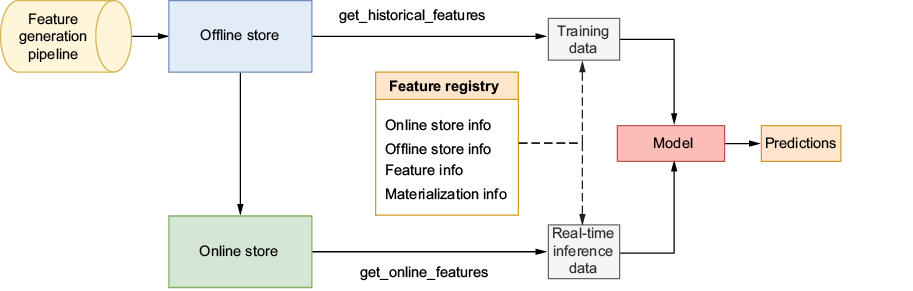
Trace the feature pipeline, registry, offline retrieval, and periodic materialization into the online store. section 4.2
