The OpenTelemetry Collector is a vendor-neutral service for receiving, processing, and exporting telemetry. It acts as an all-purpose agent between applications or infrastructure and backend destinations, supporting correlation across logs, metrics, and traces. section 4.3 section 4.6
A collector is organized into independent pipelines, each dedicated to one signal type. Receivers obtain signals, processors transform or batch them, and exporters deliver them to backends. Multiple pipelines can serve the same signal type when environments or policies differ. section 4.3.2
A typical deployment uses the collector to:
- Receive traces and metrics from applications or infrastructure, commonly through OTLP or a Prometheus receiver. section 4.3.2
- Apply edge processing such as batching before forwarding telemetry. section 4.3.2
- Provide an intermediate hop that can participate in reliable multihop delivery and backpressure signaling through OTLP. section 4.3.2
Docker Compose telemetry path
A local microservices setup runs the collector on OTLP port 4317. A metrics pipeline receives Prometheus data, batches it, and exports it for Prometheus; a traces pipeline receives OTLP spans, batches them, and exports them to Jaeger. Prometheus then scrapes the collector, while Jaeger provides trace exploration.
Trace-only deployment
A simpler configuration accepts OTLP traces over gRPC, batches them with a one-second timeout and batch size of ten, and exports them to Jaeger. This pattern supports a distributed-tracing setup without requiring a metrics pipeline.
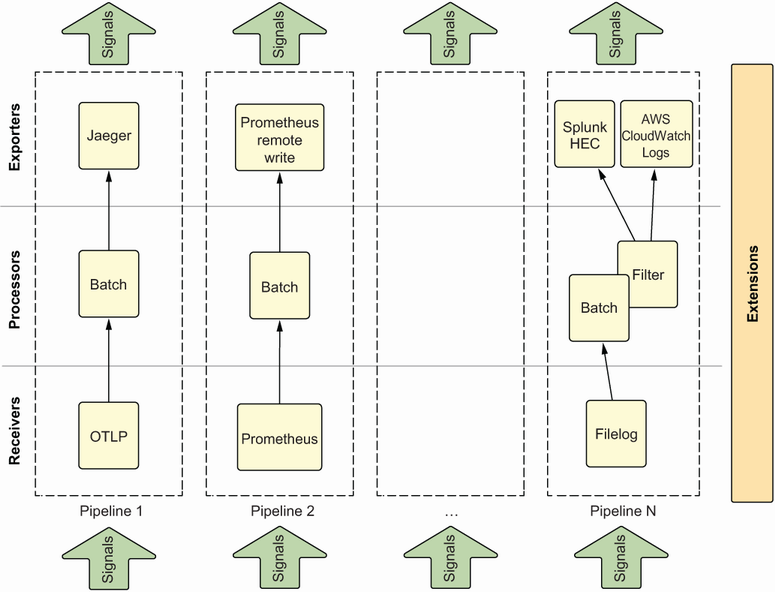
Use the component diagram to see how receivers, processors, and exporters assemble into collector pipelines. section 4.3.2
OTLP uses request–response delivery and can run over gRPC or HTTP, with WebSockets identified as a future option. Because native OTLP support is not universal, deployments may still combine OpenTelemetry with signal-specific or vendor-specific components. section 4.3.2 section 4.0
Operationally, collectors should remain secure, performant, and lean. Their resource usage can itself be investigated: enabling the pprof extension exposes profiles that Parca can scrape for troubleshooting. section 4.6 section 9.1.5


