An option element represents one selectable choice inside a select element. Together, they constrain entry to a fixed set of values instead of accepting open-ended input through an input element. section 27.6
Use option elements in two main ways:
- Define choices directly when the available values are stable, such as Watersports, Soccer, and Chess. section 27.6
- Generate choices from application data with select and asp-items, passing a sequence of SelectListItem objects or adapting data through SelectList. section 27.7
- Let the SelectTagHelper associate the select with a model property while the OptionTagHelper selects the matching option. section 27.6
Reflecting the selected model value
A product whose CategoryId is 2 can render an option such as <option value="2" selected="selected">Soccer</option>. The generated HTML marks the option corresponding to the model value, so the form displays the product’s current category. section 27.6
Creating a related category
A category select can include an option with value -1 labeled Create New Category.... JavaScript can reveal a separate category editor when that option is chosen, allowing the new category to be saved before the product is validated. section 31.4.1
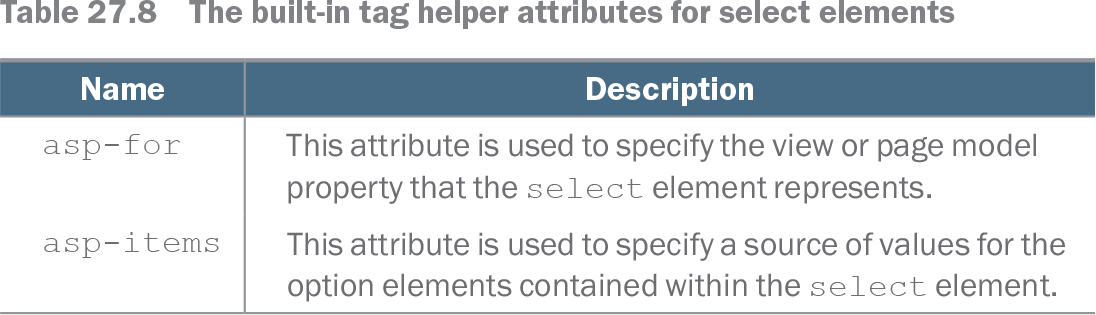
Table 27.8 The built-in tag helper attributes for select elements (view table figure)
| Name |
Description |
|---|---|
| asp-for |
This attribute is used to specify the view or page model property that the select element represents. |
| asp-items |
This attribute is used to specify a source of values for the option elements contained within the select element. |
Use the select tag helper attribute reference to compare asp-for, which identifies the represented model property, with asp-items, which supplies option values. section 27.6