A web origin combines a resource’s scheme, domain, and port. Browsers use this combination as a security boundary when JavaScript requests another resource. section 29.3
Two URLs have the same origin only when all three parts match. Their paths may differ, so http://example.com/home and http://example.com/site.css remain same-origin. section 29.3
A URL becomes cross-origin when any required part changes:
- https://example.com uses a different scheme from http://example.com. section 29.3
- http://www.example.com uses a different domain, including a subdomain. section 29.3
- http://example.com:5000 uses a different port from HTTP’s default port 80. section 29.3
The browser’s same-origin policy blocks JavaScript from calling a different-origin API unless that API explicitly permits the request through CORS response headers. ASP.NET Core can define CORS policies globally or for selected endpoints. section 29.3 section 29.5
Shopping site and product API
An app at http://shopping.com requesting data from http://api.shopping.com is cross-origin because the domains differ. Without an appropriate CORS policy, the browser blocks the JavaScript request. section 29.3
Figure 29.6 The console log for a failed cross-origin request. Chrome has blocked a cross-origin request from the app http://shopping.com:6333 to the API at http://api.shopping.com:5111.
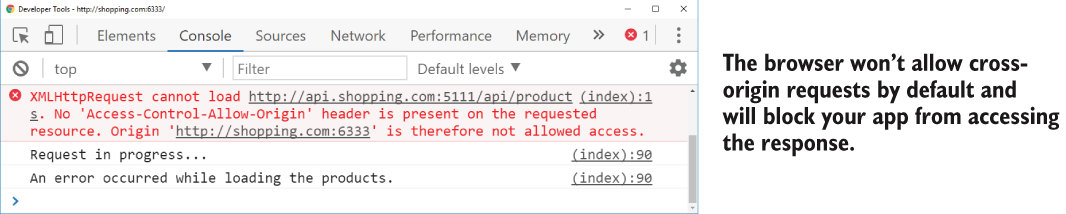
Inspect the browser console failure showing an app and API with different domains and ports. section 29.3


