An OSPF process is a locally running OSPF instance on a router. Create it with `router ospf process-id` to enter router configuration mode, where commands such as `network` activate OSPF on interfaces. Each process independently calculates routes, although running multiple processes is uncommon. section 18.2 section 17.4
Keep these process-level behaviors in mind:
- Treat the process ID as locally significant; neighboring routers can use different process IDs and still become neighbors. section 18.2
- Give the router a unique router ID (RID); configure it manually with `router-id`, or let OSPF select the highest operational loopback or physical-interface address. section 18.2.1
- Activate interfaces with `network ip-address wildcard-mask area area-id`; matching interfaces run OSPF and advertise their connected prefixes. section 17.4
- Keep the process enabled with `no shutdown`; a shutdown process takes its OSPF adjacencies down. section 18.3.3
Create a process and verify its RID
Enter OSPF router configuration mode, then inspect the selected RID: `R1(config)# router ospf 1` `R1(config-router)# do show ip protocols` `Routing Protocol is "ospf 1"` `Router ID 203.0.113.1` A process with no operational interface address cannot start until a RID is configured or an interface becomes operational. Configure a stable RID with `router-id 172.16.1.1`, then reset the OSPF process when required for the change to take effect. section 18.2.1
Figure 18.5 A single-area OSPF network of four routers. R3 connects to the 10.1.3.0/24 subnet on its G0/1 interface, a passive interface. R1 connects to the internet and advertises a default route to the other routers.
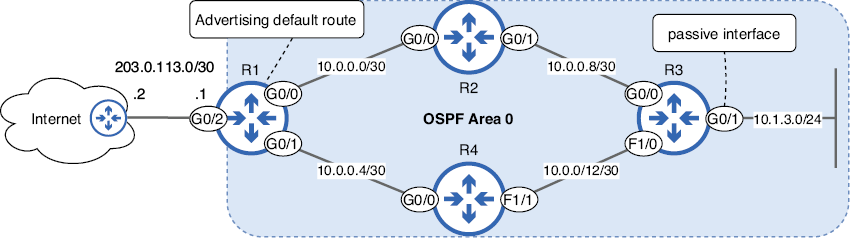
Use the four-router single-area topology to connect process creation with interface activation, passive interfaces, and default-route advertisement. section 18.2
