router ospf is a Cisco IOS global-configuration command that creates or selects an OSPF process and enters router configuration mode. From there, you configure the process with commands such as network, router-id, and passive-interface. section 18.2 section 17.4
Use the command with a process ID, then remember these operational points:
- Syntax: router ospf process-id. The process ID identifies a local OSPF instance and does not need to match neighboring routers. section 18.2
- After entering router configuration mode, activate interfaces with network ip-address wildcard-mask area area-id or configure OSPF directly under an interface with ip ospf process-id area area. section 17.4 section 18.5
- The command creates the process before manual router-id configuration is possible. Without an operational IP interface or configured router ID, the process cannot start. section 18.2.1
- Verify the process and router ID with show ip protocols; each router ID must be unique within the OSPF autonomous system. section 18.2.1 section 18.5
Create OSPF process 1
R1(config)# router ospf 1 R1(config-router)# network 192.168.1.0 0.0.0.7 area 0 R1(config-router)# do show ip protocols ... Routing Protocol is "ospf 1" Router ID 203.0.113.1 The first command creates process 1, the network command activates OSPF on matching interfaces in area 0, and the verification command displays the active process and selected router ID. section 18.2 section 17.4
Figure 18.5 A single-area OSPF network of four routers. R3 connects to the 10.1.3.0/24 subnet on its G0/1 interface, a passive interface. R1 connects to the internet and advertises a default route to the other routers.
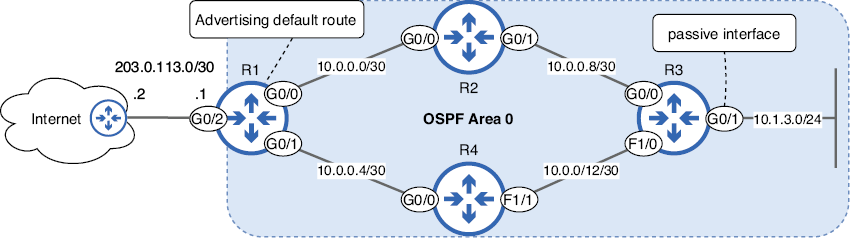
Use the four-router single-area topology to place router ospf in a practical OSPF configuration sequence, including interface activation and default-route advertisement. section 18.2
