A package manager installs, updates, removes, and manages software packages and their dependencies. It brings app-store convenience to the terminal: instead of downloading and configuring developer tools manually, you use commands. Homebrew is a widely used package manager for macOS. section 2.1 section 2.8
A package manager can:
- Install software and the other programs it depends on. section 2.1
- Handle version compatibility and update installed packages. section 2.1
- Search, inspect, list, and remove packages with commands. section 2.8
Using Homebrew
Install a developer tool such as wget with brew install wget. Run brew update followed by brew upgrade to update package information and installed software. section 2.8 section 2.0
Figure 2.1 The Homebrew installation flow for a single package. Homebrew automatically handles version detection, dependency resolution, downloading, and installation. Updating installed packages is covered in section 2.5.
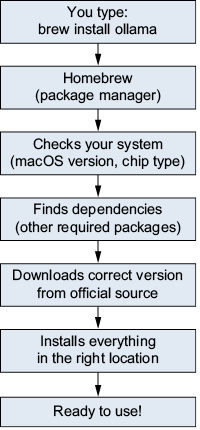
Shows how Homebrew handles version detection, dependencies, downloading, and installation for one package. section 2.1



