A Page is the full-screen or full-window view that a .NET MAUI app displays. It is the top-level UI container: the app can render a page directly, while a page renders its child layout and that layout arranges controls such as labels, entries, images, and buttons. section 4.1 section 2.3
To show an initial screen, create a Page-derived type such as ContentPage and assign an instance to the Application.MainPage property. Although templates commonly name the type MainPage, the name is conventional; the essential requirement is that MainPage receives a Page object. section 2.3
Build a screen from a ContentPage
Use ContentPage as the outer element, then place one layout inside it. The layout can contain the visible controls. For example, a ScrollView can contain a VerticalStackLayout, which holds an Image, Labels, and a Button. The page supplies the screen; the layout supplies the arrangement. section 2.3 section 4.1
Keep these roles distinct when building a UI:
- Page—A navigable, usually full-screen view. A Page contains one child layout. section 3.4
- Layout—A view that positions child items onscreen, such as Grid or VerticalStackLayout. section 3.4
- Control—A view that displays information or accepts input, such as Label or Entry. section 3.4
Pages inherit common rendering properties plus lifecycle methods and events. Those inherited properties are bindable, so they can receive direct values or bind to matching properties in a binding context. A page binding context normally cascades to its layouts and controls unless a child sets its own. section 7.2 section 3.4
A page also represents UI logic in MVVM: its layout defines where elements appear, and its behavior defines what they do. A page may contain a Grid with display and input controls, while animations and other responses form its behavior. section 9.3.2
Figure 4.2 An app knows how to render pages, and pages know how to display a single layout. Layouts define how to arrange controls or other layouts on the screen. In this example, an app renders a home page with a Grid layout as a child. The Grid layout here has five child items, including a VerticalStackLayout in the middle. The VerticalStackLayout has three controls as child items: an Image, a Button, and an Entry.
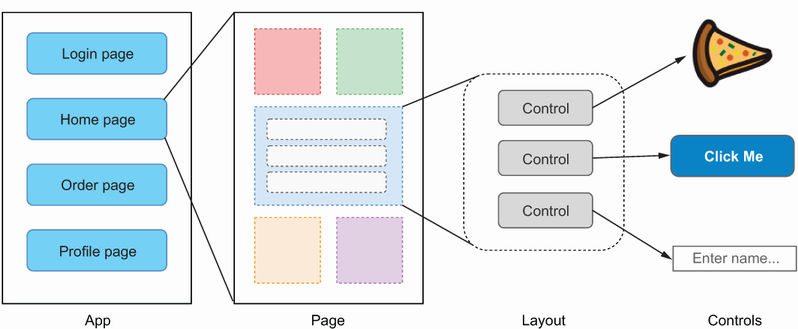
This hierarchy shows the rendering chain: the app displays a page, the page hosts a layout, and layouts host controls or nested layouts. section 4.1
