A password is secret authentication data that protects identities, systems, vaults, and automated connections. Treat it as sensitive information: never place it directly in a script, repository, email, or other portable artifact. section 4.1.1 section 4.3.2
Apply password handling as an operational security decision:
- Keep passwords, API keys, SSH keys, certificates, tokens, usernames, and connection details outside scripts. section 4.1.1
- Store credentials in a managed secret vault instead of embedding them in automation. section 4.0 section 4.3.2
- Choose interactive password protection for human-operated access, but evaluate whether it blocks unattended automation. section 4.3.2
- When removing the vault password requirement, secure and audit the account and machine that contain the vault. section 4.3.2
Unattended SQL health check
A SQL health check retrieves secure SQL and SMTP connection data, verifies that databases use the SIMPLE recovery model, and emails a report when configuration is incorrect. SecretStore can be configured with Authentication None and Interaction None so password prompts do not stall the scheduled automation; the hosting account and machine then require stronger protection and login auditing. section 4.0 section 4.3.2
Figure 4.1 The SQL health check automation will send a notification if the recovery model is not set properly.
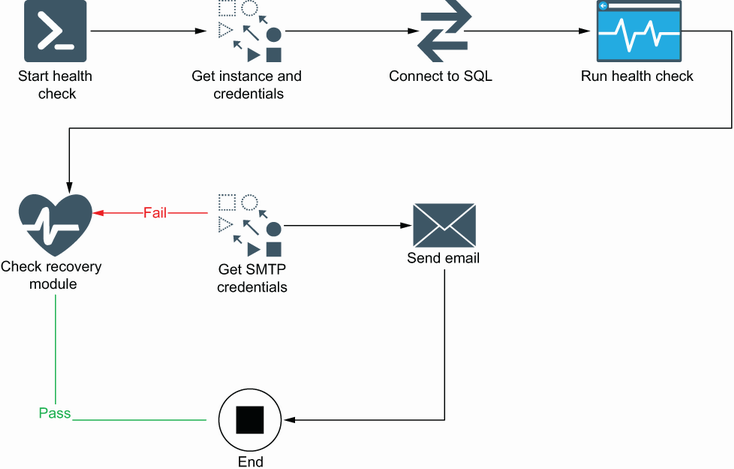
Shows the SQL health-check flow that connects to a database, checks recovery configuration, and sends a notification for an incorrect setting. section 4.0








