A password is a human-chosen secret used to authenticate a person. In a typical web login, the server is already authenticated and the password upgrades that one-way trust into mutual authentication. Passwords remain practical and widely accepted, but reuse, low entropy, and database breaches make them fragile. section 11.2 section 11.4
Common ways to reduce password risk include:
- Use a password manager to generate and remember a distinct strong password for each service, protected by one master password. section 11.2.1
- Use single sign-on (SSO) to authenticate to multiple services through one account; common protocols include SAML and OpenID Connect. section 11.2.1
- Consider asymmetric PAKEs such as OPAQUE when a server should authenticate users without learning or storing their passwords. section 11.4
A familiar login threat
Registering the same password across several websites turns one database breach into a broader account risk. A password manager replaces reuse with separate generated passwords, while SSO replaces many service passwords with one account relationship. section 11.2 section 11.2.1
Figure 11.2 User authentication typically happens over a channel that is already secured but where only the server is authenticated. A typical example is when you browse the web using HTTPS and log into a web page using your credentials.
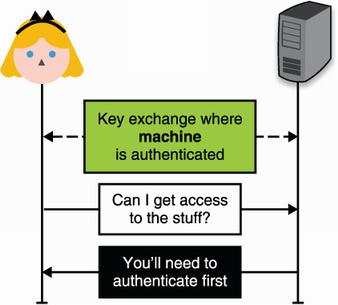
Use the authentication-channel diagram to see how a password login adds user authentication to an already secured connection. section 11.2
Figure 11.3 An example of single sign-on (SSO) on the web. By having an account on Facebook or Google, a user can connect to new services (in this example, Airbnb) without having to think about a new password.
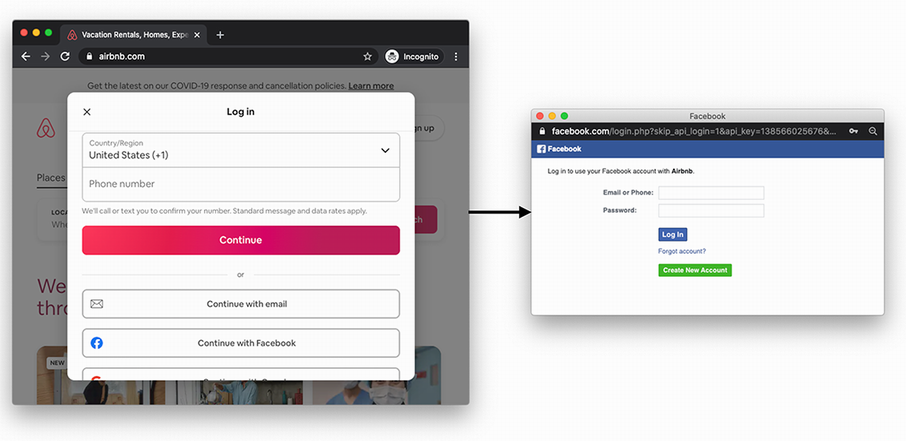
Use the SSO example to visualize logging into a new service through an existing provider account. section 11.2.1








