A password hash is a one-way cryptographic representation of a password. Attackers may target it for offline recovery, credential reuse, authentication abuse, lateral movement, or privilege escalation. section 10.2.3 section 10.2.1
In deception-based threat hunting, defenders plant traces of a user password hash across Windows clients and servers. An adversary who dumps the hashes may recognize the account, attempt password recovery, and reuse the result against other systems. section 10.2.3
A password-hash breadcrumb supports this adversary scenario:
- Plant traces of a fake account password hash on Windows servers and endpoints. section 10.2.1
- Let an adversary discover or extract the hash, including through credential material held in LSASS process memory. section 10.2.3
- Use the resulting alert to investigate attempted recovery and access against other systems. section 10.2.3
Windows breadcrumb scenario
A predominantly Microsoft environment places traces of a fake account password hash on realistic Windows servers and endpoints. An intruder harvesting hashes notices the account, tries to recover its password, and attempts access elsewhere in the network. section 10.2.1 section 10.2.3
Figure 10.1 How an adversary might capture breadcrumbs and play them against other hosts
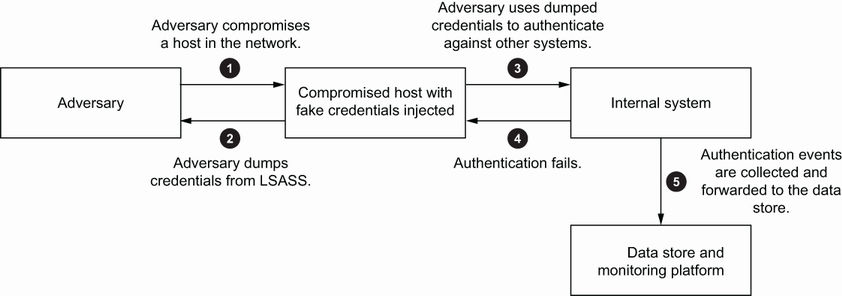
Follow the breadcrumb workflow from capture through attempted reuse across other hosts. section 10.2.3

