A pattern table stores the pixel shapes used to draw NES tiles and sprites. Graphics come from an 8K cartridge area or, in some configurations, writable graphics RAM; the PPU uses this data rather than a display where every screen pixel is independently controlled. section 1.2 section 1.5.2
Each pattern is an 8 × 8 pixel shape. A tile row occupies two bytes: combining the corresponding bits produces a 2-bit pixel value from 0 to 3. That value selects a color within a palette; a background tile also uses an attribute value to choose one of four background palettes shared by each 2 × 2 tile area. section 6.5.2
Figure 6.5 How the two pattern table bytes combine
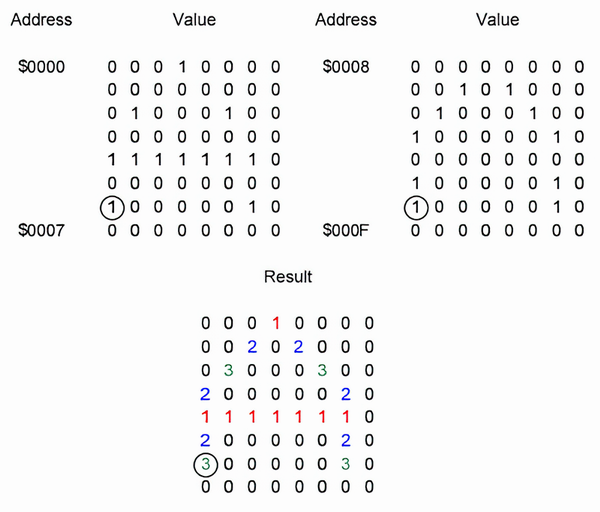
Use the bit-combination diagram to see how two bytes describe one row of four-color pixel values. section 6.5.2
Pattern tables support both layers of NES graphics:
- Background tiles form screen layouts. The same tile pattern can appear in multiple places and use different palette entries through the attribute table. section 6.9
- Sprites are movable objects drawn in front of or behind background tiles. A sprite can use one 8 × 8 pattern in 8 × 8 mode or two patterns in 8 × 16 mode. section 7.1
- The PPU control setup can select the first pattern table for backgrounds and the second for sprites. section 6.4
Ship, bullet, and animated stars
A player ship larger than 8 × 8 pixels is assembled from four patterns and four sprites, while a bullet needs one pattern and one sprite. Background stars can animate by leaving their screen locations unchanged and periodically changing the tile-pattern number written there; keep the number of video-memory changes small each frame. section 7.2 section 13.2.1 section 13.2
Before a title screen or game screen can use its graphics, load the required tile and sprite patterns from ROM into PPU video memory when the chosen storage arrangement requires it. Pattern editing can add new shapes to an existing background tile set. section 1.5.1 section 13.2
