A sprite is an NES hardware object for a movable game graphic. Unlike background tiles, sprites can sit in front of or behind the tile background, letting the PPU combine layers without redrawing individual screen pixels. Blank sprite pixels reveal the graphics beneath them. section 7.1 section 1.5.2
Sprites are built from 8 × 8 patterns loaded from game ROM into video memory. The PPU uses either 8 × 8 sprites, each made from one pattern, or 8 × 16 sprites, each made from two patterns; one mode applies to every sprite currently displayed. section 1.5.2 section 7.1
The NES imposes practical limits that shape sprite design:
- Display up to 64 sprites, numbered 0 through 63; lower-numbered sprites are drawn first. section 7.1
- Display no more than eight sprites on one horizontal row. section 7.1 section 7.7
- Use separate sprite palette tables, providing another 12 colors alongside the 13 background colors visible at once. section 7.7
- Choose whether each sprite appears in front of or behind background tiles, and optionally flip its pattern horizontally or vertically. section 7.1
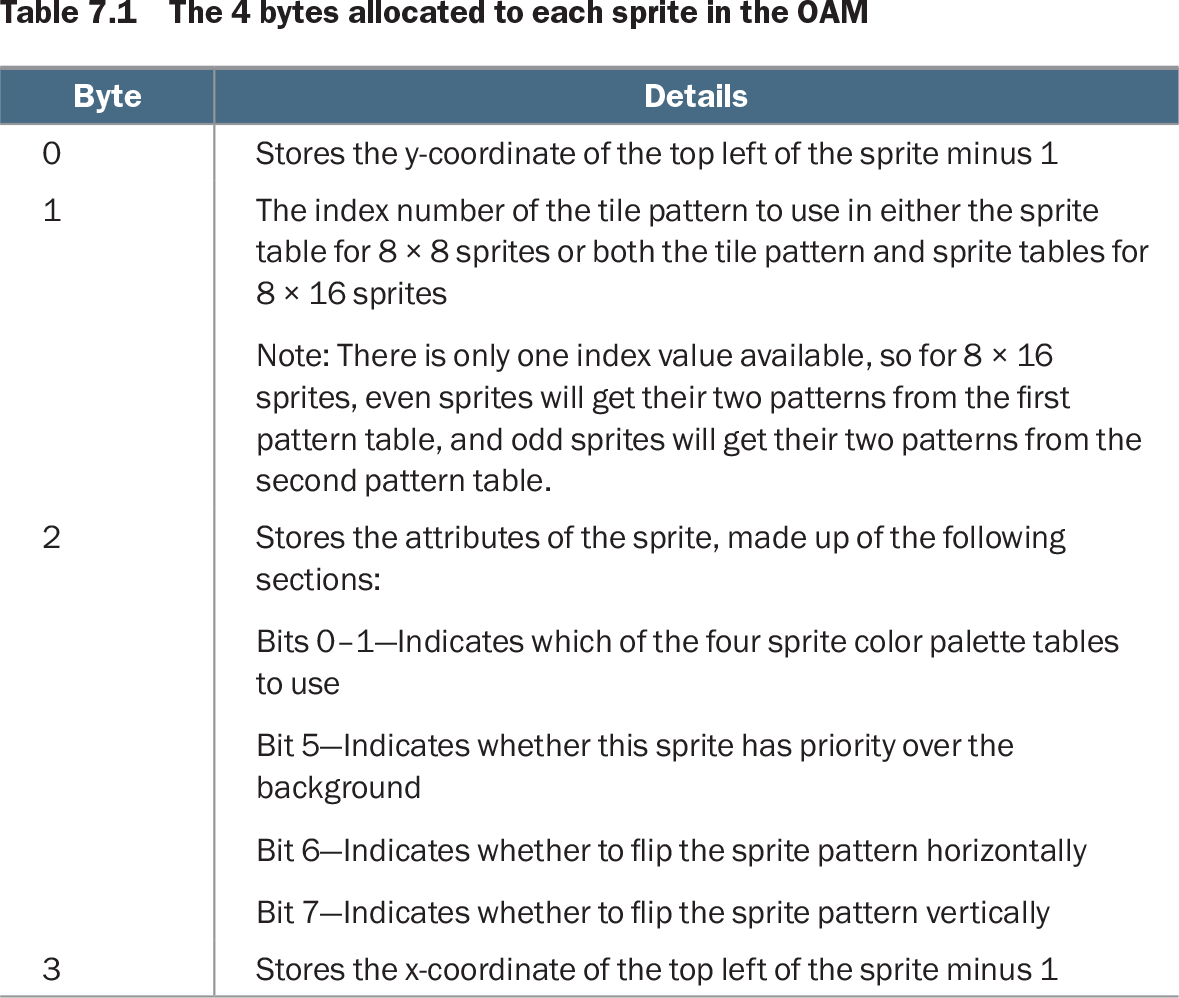
Each sprite occupies four bytes in the OAM table: its vertical position, pattern index, attributes, and horizontal position. Attributes select one of four sprite palettes and hold priority and flip settings. Update OAM either byte by byte or, usually, by copying the complete 256-byte table from CPU memory with sprite DMA during vBlank to save CPU cycles. section 7.1
Figure 7.1 Sprite and tile background layers
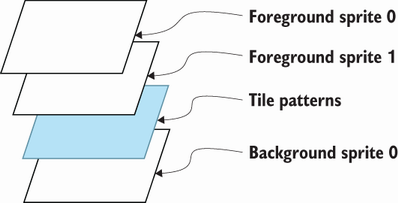
Use the layer diagram to see how blank pixels allow sprites and background tiles to show through one another. section 7.1
Table 7.1 The 4 bytes allocated to each sprite in the OAM (view table figure)
Inspect the OAM table to map sprite position, pattern, palette, priority, and flip settings to their four control bytes. section 7.1
Ship and bullet
A player ship can use one sprite while left and right gamepad input changes its position. A second sprite can represent a bullet: an action-button press places it onscreen, then gameplay moves it upward. This turns sprite patterns and OAM positions into visible player objects. section 7.0
Sprites also suit simpler demonstrations such as a bouncing ball and a controller-controlled bat. They provide a reusable way to add independently moving objects while background tiles hold the more static screen layout. section 5.0 section 7.1