PDF merging combines separate PDF files into one ordered document. It replaces repetitive manual work, such as placing each person’s cover page before their report. section 9.0 section 9.4
A practical merging workflow separates the task into these steps:
- Find the matching cover and report files. section 9.4
- Place the one-page cover before every page of its report. section 9.4
- Write each combined sequence as a finalized PDF. section 9.4.1
Cover pages for reports
For files named cover1.pdf and 1.pdf, produce a final PDF beginning with cover1.pdf and continuing through every page of 1.pdf. PyPDF2 can read both inputs, add their pages to a writer, and save the result as a new file. Alternatively, subprocess can call pdftk with the cat and output arguments. section 9.4 section 9.4.1
Figure 9.1 Illustration of the desired process of creating combined .pdfs by merging the report cover in the cover directory with the report in the report’s directory. Note that the reports may be more than one page.
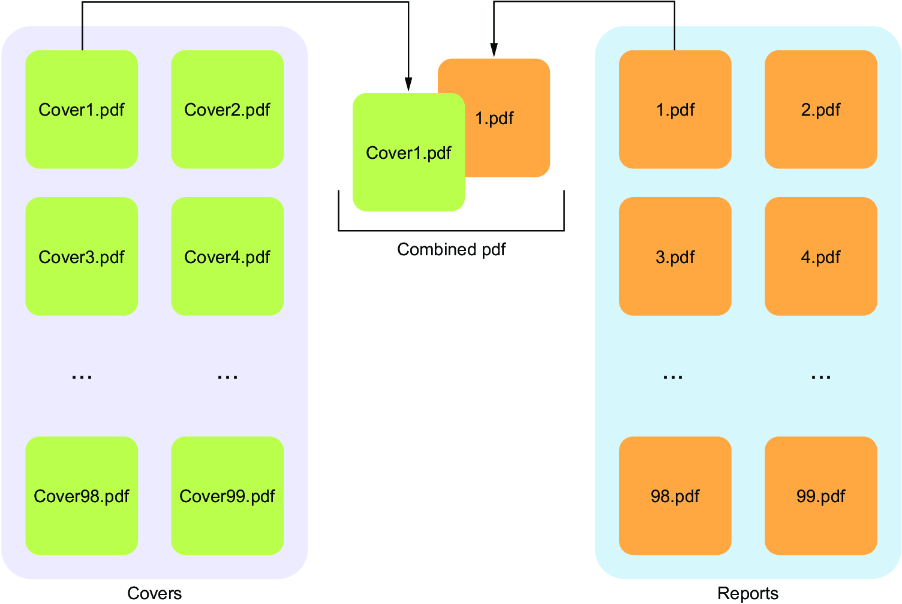
Use the process illustration to trace how a cover-directory PDF and report-directory PDF become one combined PDF, including reports longer than one page. section 9.4
