A permission is an authorization an operating system requires before an app accesses a protected capability or resource. Location access is privacy-sensitive: users must explicitly consent, and the app must check or request that consent at runtime. section 3.1 section 3.5
Permission handling has two parts. First, declare the capabilities the app may request in platform-specific metadata rather than ordinary application code. Second, use .NET MAUI methods to verify whether the user has consented and request permission when necessary. Android and iOS require declarations for requested permissions; each platform stores them in its own metadata file. section 3.1 section 3.5
For a .NET MAUI app that reads the user’s location:
- Declare the location capability in the platform metadata. section 3.1
- Check whether the user has already granted access. section 3.1
- Request consent at runtime if access has not been granted. section 3.1
- Only then access location through the common .NET MAUI geolocation API. section 3.1
Windows location capability
Open Platforms/Windows/Package.appxmanifest, find the Capabilities node, and add <DeviceCapability Name="location" />. This declares that the Windows app will ask for the user’s permission to access location. section 3.1.3
Figure 3.4 To access a user’s location, your app must request permission from the user. With .NET MAUI, you can check whether permission has been granted and request it from the user if not.
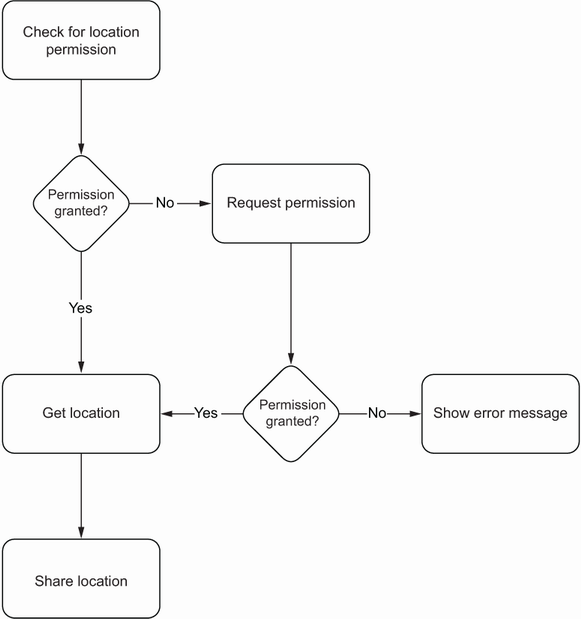
The permission flow checks whether location access has been granted and requests it from the user when necessary. section 3.1



