A persistent connection establishes remote sessions before command execution and keeps them active until explicitly closed. This separates connection setup from script execution, enabling parallel work across multiple devices and isolating failed connections. section 5.2.2
Apply the pattern by:
- Creating a group of remote connections before running the script. section 5.2.2
- Executing the remote script against active sessions at the same time. section 5.2.2
- Accounting for failed connections so one unavailable device does not stop the others. section 5.2.2
- Testing connection counts against available memory, bandwidth, and command workload; PowerShell remoting allows 32 persistent connections per session by default. section 5.2.2
Faster server checks
Checking 20 servers sequentially at 30 seconds each takes about 10 minutes. Establishing persistent connections and executing against the servers in parallel can reduce the overall time, while still allowing failed connections to be handled separately. section 5.2.2
Figure 5.4 Comparison of the number of executions in a 5-minute window when using persistent connections for parallel execution versus individual executions
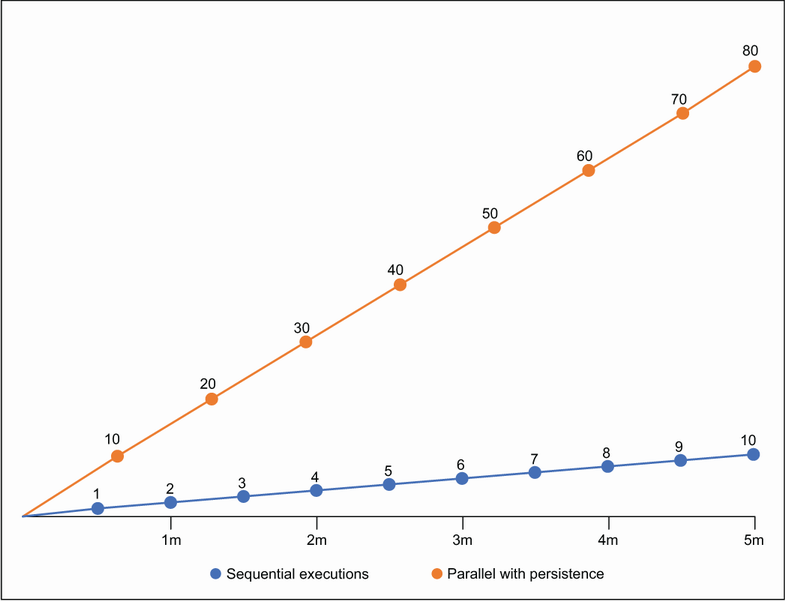
Compare individual executions with persistent-connection parallel execution over a five-minute window. section 5.2.2

