A pipeline engine executes a reusable pipeline definition. It creates an instance for each run, executes its tasks in sequence, and can pass data from one task to the next. A failed task stops the run and marks it failed; otherwise, the run can be marked successful. Check the expected outputs as well as the run status. section 3.1
Figure 3.2 A pipeline definition can be instantiated by a pipeline engine multiple times, and it describes what needs to be done. The pipeline engine creates pipeline Instances, which run the tasks included in the pipeline definition. These pipeline instances can fail or run for longer periods of time depending on the tasks that they are performing. As a user, you can always ask the pipeline engine the status of a particular pipeline instance and its tasks.
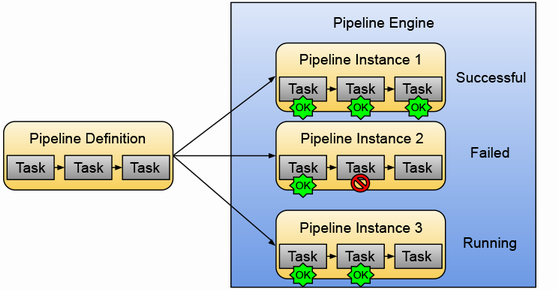
The diagram distinguishes one pipeline definition from multiple instances with different run states. An instance can also be given parameters to produce a different output. section 3.1
Two engines offer different ways to define and run service pipelines:
- Tekton runs in Kubernetes. Installing it adds custom resource definitions for Tasks and Pipelines and a pipeline controller that executes them. A webhook listener can receive events from external sources such as Git repositories; a dashboard and the tkn CLI are optional additions. section 3.5.1
- Dagger defines pipelines in code through language SDKs. Its engine can run locally or remotely using an OCI container runtime, without requiring Kubernetes resources or YAML. Teams can distribute pipeline code with their language’s packaging tools. section 3.5.4
Run and inspect a Tekton task
Define a Task whose echo step accepts a name parameter, then create a TaskRun that references it and supplies a value. Run `kubectl get taskrun` to check whether it succeeded, `kubectl get pods` to find its pod, and `kubectl logs -f <pod-name>` to inspect the greeting. The Task is the reusable definition; the TaskRun is an execution. section 3.5.1
Choose the engine alongside the team’s workflow. Tekton makes tasks and pipelines Kubernetes resources; Dagger lets teams write and reuse pipeline code with familiar language tools across local and remote environments. Either way, the useful feedback is the state of each run and whether it produced its intended artifact or other output. section 3.5.1 section 3.5.4 section 3.1
