A port number identifies a network service or application endpoint on a host. Firewalls use ports, together with protocols and source or destination addresses, to allow or deny traffic. For a web server, expose only port 80 for HTTP and port 443 for HTTPS; keep unnecessary external ports closed. section 5.0 section 5.4
Apply least-privilege network access by opening only the ports required for a specific connection:
- Allow TCP port 22 when an SSH request must reach an EC2 instance from an approved source. section 5.4
- Allow inbound TCP port 2049 from the client security group when EC2 instances mount an EFS filesystem through NFSv4.1. section 9.2
- Review outbound rules as well as inbound rules; restricting outgoing SMTP, for example, can prevent a test system from emailing customers. section 5.4
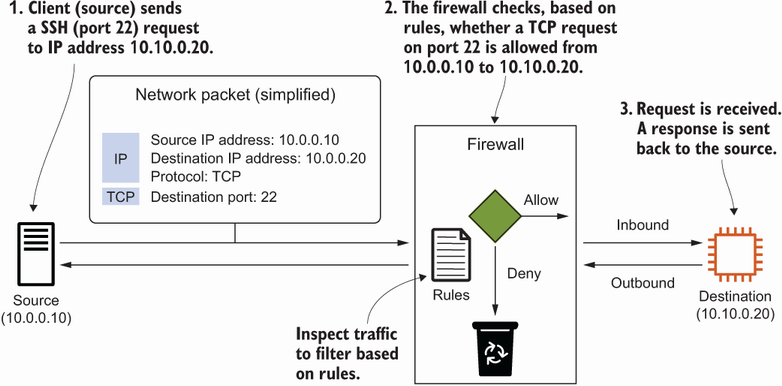
Trace an SSH request from its source IP address through the AWS firewall to its destination, and see how a port rule controls access. section 5.4
EFS mount target
Protect an EFS mount target with a security group that permits inbound TCP port 2049 only from the client security group. This supports a changing fleet of authorized clients without granting access by individual IP address. section 9.2






