Port security limits how many unique MAC addresses a switch can learn on an interface and specifies what happens when that limit is exceeded. This reduces exposure to DHCP exhaustion and MAC flooding, where spoofed addresses fill the MAC address table and cause unknown-destination frames to be flooded. section 12.1 section 12.1.1
Configure and verify a basic Cisco IOS port-security policy as follows:
- Enter interface configuration mode, explicitly configure the port as an access or trunk port, and enable port security with switchport port-security. Dynamic DTP ports reject the port-security command. section 12.1.2
- The default maximum is one MAC address per port. A learned address is called a secure MAC address; static and dynamically learned secure addresses can coexist. section 12.1.2
- Use show port-security interface interface to check whether security is enabled, the port state, violation mode, maximum and current addresses, last source address, and violation count. section 12.1.2
- Increase the allowed address count with switchport port-security maximum maximum when multiple legitimate devices share a port. section 12.2
A violation on F0/1
With the default maximum of one address and shutdown mode, F0/1 learns 3c57.311a.a480, then receives a frame from 00e0.4c68.92ff. The switch logs a security violation and error-disables the port. show port-security interface f0/1 reports Secure-shutdown, zero current MAC addresses, the offending last source address, and a violation count of one.
Select the violation response according to the operational impact:
- Shutdown, the default, discards violating traffic, increments the counter, generates notifications for the first violation, and error-disables the port. section 12.2.1
- Restrict keeps the port up while discarding violating frames, incrementing the violation counter, and generating Syslog and SNMP notifications. section 12.2.1
- Protect keeps the port up and silently discards violating frames without incrementing the violation counter or generating notifications. section 12.2.1
Figure 12.1 A MAC flooding attack. The attacker fills up SW1’s MAC address table with spoofed MAC addresses, preventing SW1 from learning PC1’s and R1’s MAC addresses. As a result, SW1 floods all frames sent between PC1 and R1.
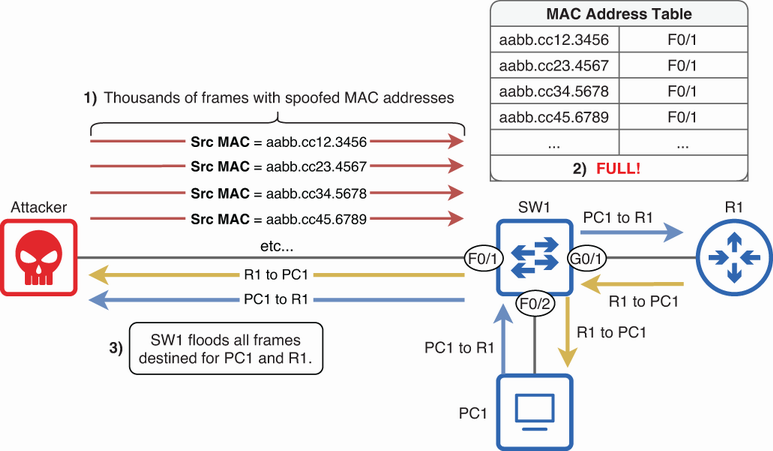
Trace how spoofed MAC addresses fill a switch’s MAC address table, prevent legitimate learning, and cause frames between known hosts to be flooded. section 12.1.1
