liveBook · Manning

PowerShell Gallery

As explained in Learn PowerShell in a Month of Lunches: Fourth Edition, Covers Windows, Linux, and macOS

PowerShell Gallery is an online repository for discovering and distributing PowerShell modules, scripts, and related packages.

PowerShell Gallery is an online repository for discovering and distributing community-contributed PowerShell modules and related packages. PowerShellGet searches, installs, updates, and registers repositories, much like Linux package managers. Treat downloaded code cautiously: Microsoft operates the gallery but does not validate or endorse every contribution. section 7.2 section 9.2

A practical workflow uses these commands:

  • Search with Find-Module, inspect package details and compatibility, then install with Install-Module. section 7.2 section 9.2
  • Verify an installed but unloaded module with Get-Module -ListAvailable, and inspect its commands with Get-Command -Module. section 7.2 section 9.2
  • Register an internal gallery with Register-PSRepository when private distribution is needed. section 7.2

Find and install a YAML module

Run Find-Module *YAML*, review the results, install powershell-yaml, and use Get-Command -Module powershell-yaml to discover ConvertFrom-Yaml and ConvertTo-Yaml. Review unfamiliar code before trusting it. section 9.2
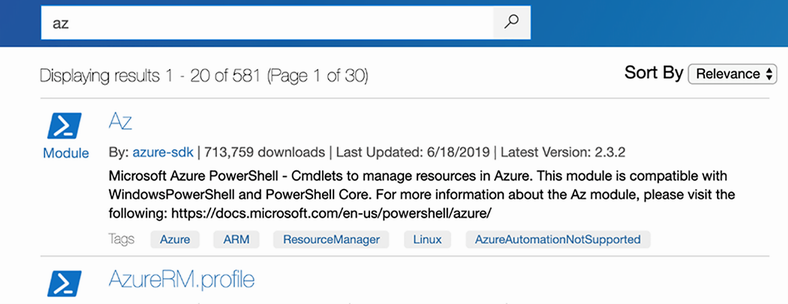
Figure 7.1 Showing the search for Az in the PowerShell Gallery

Browse the Az module search as a concrete example of locating a package in the gallery. section 7.2

How Learn PowerShell in a Month of Lunches: Fourth Edition, Covers Windows, Linux, and macOS covers it

How deep it goes
Demonstrates search, compatibility checks, installation, verification, and trust review, but stops short of repository administration details.
Examples
Uses Az, powershell-yaml, Find-Module, Install-Module, and Get-Command examples.
What it assumes
Assumes a current PowerShell installation and basic command use; teaches module discovery and installation through runnable commands.
What you can do after
Apply PowerShellGet to locate, install, verify, and inspect modules while reviewing untrusted code.
How it connects
Connects modules with PowerShellGet, repositories, package managers, PowerShell Core, and command discovery.

Related concepts

This explainer was generated by Manning's knowledge graph from the text of Learn PowerShell in a Month of Lunches: Fourth Edition, Covers Windows, Linux, and macOS. The section links point to the parts of the book it draws on.