A pre-shared key (PSK) is a secret configured on every wireless client and access point in a WPA-Personal network. It authenticates shared access and helps generate encryption keys. section 20.2 section 20.2.1
Configure and evaluate PSK authentication by distinguishing its format, sequence, and security scope:
- Use either a static 256-bit PSK represented by 64 hexadecimal characters or an 8- to 63-character passphrase that is converted into a 256-bit PSK. section 20.2.1 section 21.3.1
- Configure the same PSK on the access point and every client in the basic service set. section 20.2.1
- In WPA and WPA2, let the client perform Open System Authentication and associate first; then use the four-way handshake to confirm the PSK and generate unique encryption keys. section 20.2.1
- In WPA3-Personal, use SAE before association to verify matching PSKs and resist handshake-based brute-force attacks, followed by the four-way handshake. section 20.2.1
- Prefer WPA2 with AES and PSK for the stated CCNA configuration scope; leave original WPA and TKIP disabled because they are no longer considered secure. section 21.3.1
WLC WPA2-PSK configuration
In the WLAN Layer 2 security settings, select WPA + WPA2, enable WPA2 Policy and AES Encryption, disable 802.1X in favor of PSK authentication, and enter either an 8- to 63-character ASCII passphrase or a 64-character hexadecimal string. section 21.3.1
Figure 20.4 WPA-Personal authentication with a PSK. After the client associates with the AP, a four-way handshake is used to confirm that both have the same PSK and to generate unique encryption keys.
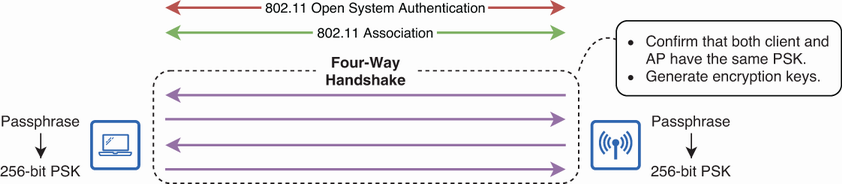
Trace the WPA-Personal sequence from Open System Authentication and association through the four-way handshake, PSK confirmation, and encryption-key generation. section 20.2.1


