A presentation layer provides prepared or aggregated data for reporting and analytical consumption. It follows upstream pipeline layers and produces clean, downstream-facing outputs. section 11.1.3
Implement the layer by deciding how its outputs are stored and organized:
- Store outputs physically as tables, materialized views, or dynamic tables, or transform them virtually as database views. section 11.1.3 section 11.1.4
- Represent the layer with a schema or database; a separate database can provide schemas for each business unit accessing the data. section 11.1.4
- Control access so consumers see only authorized presentation objects, keeping data flows separated between layers. section 11.1.4 section 11.3
- Treat the layer as optional: data marts can bypass the warehouse layer, and additional layers can be added when needed. section 11.1.3 section 11.3
Single-database organization
A Snowflake database named BAKERY_DB can represent the pipeline with separate schemas for extraction, staging, warehouse, and presentation outputs. section 11.1.4
Figure 11.3 The most common data transformation layers in data pipelines are the extraction layer, the staging layer, the data warehouse layer, and the presentation layer.
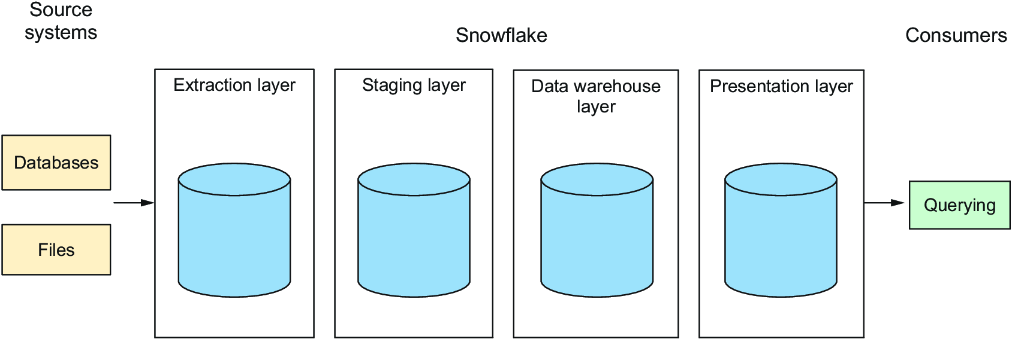
Use the layer diagram to navigate the presentation layer alongside extraction, staging, and data warehouse layers. section 11.1.3
Figure 11.4 The data transformation layers used in the examples in this chapter are implemented as a single database named BAKERY_DB, with each layer represented as a schema named EXT, STG, DWH, and MGMT.
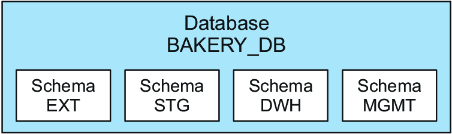
Use the physical-layout figure to compare a single-database implementation with layer-specific schemas. section 11.1.4
