A pricing table puts product versions side by side so visitors can compare a price with what comes in each option. Think of it as a tidy menu: scan the choices, pick the one that fits, and press the button. section 10.5
On a landing page, place the pricing table after the product description and testimonials. Give the section a clear invitation, such as “Select the version that’s right for you!”, so the comparison has a job instead of merely sitting there looking important. section 10.5
Build each option as the same small stack of HTML elements:
- Wrap all options in a product-versions section and a container. section 10.5
- Use one product-version block per option, with a version title and a version price. section 10.5
- Add one version-item block for every included feature, then finish with an order button. section 10.5
- Keep the blocks equal in width so three versions line up across the page. section 10.5
Three versions, one easy comparison
A set of eBook, Print, and eBook+Print Bundle options makes the pattern visible: each card has a name, a price, included items, and an action. The bundle’s price receives an extra class that changes its background to darkorchid and its text to white, making that option stand out without turning the rest into visual soup. section 10.5 section 10.5
The CSS does the organizing. Give the whole area padding and a background color; float each product-version left at 33.33% width; then add borders, centered text, and separate sizing for titles, prices, and feature rows. Remove the final feature row’s bottom border so the card ends neatly. section 10.5
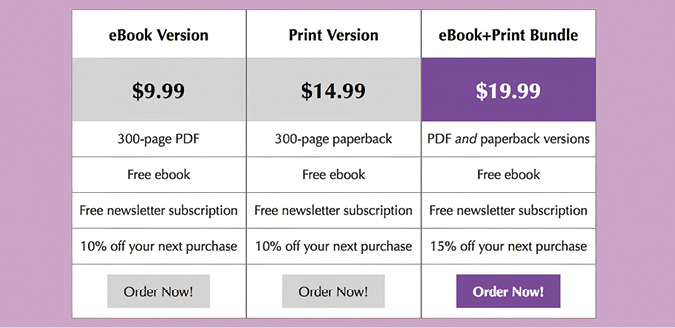
Inspect the rendered pricing area to see how repeated cards make prices and included features easy to compare at a glance. section 10.5
PLAY: Start with three plain cards before adding special treatment. Once the comparison works, highlight only the price of the option you want to feature. Reusing the general button style with a plainer button class also keeps the call to action consistent with the rest of the page. section 10.5 section 10.5
REMEMBER: a pricing table is one section of a larger landing page, alongside the header, description, testimonials, social links, and footer. Build and style it one section at a time; no need to summon the whole page at once. section 10.5 section 10.7
