Sensitive information includes passwords, connection strings, and API keys whose disclosure or misuse could harm a person, system, or organization. Keep these values out of appsettings.json and source control. section 10.2.3
Use separate storage approaches for development and production:
- Store local development secrets with User Secrets outside the project folder. section 10.2.3
- Store production secrets in environment variables rather than committed configuration files. section 10.2.3
- Treat User Secrets and environment variables as protection against accidental commits, not encryption; consider Azure Key Vault or Vault for encrypted storage. section 10.2.3
Figure 10.5 Choose Manage User Secrets to open an editor for the User Secrets app. You can use this file to store secrets when developing your app locally. These secrets are stored outside your project folder, so they won’t be committed to source control accidentally.
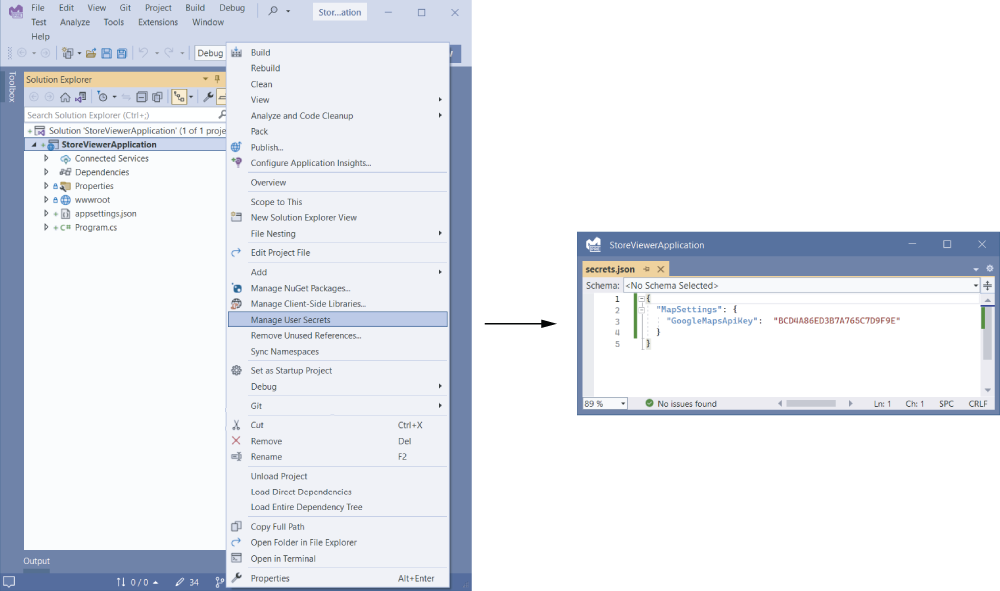
Shows where local User Secrets are managed and why storing them outside the project folder helps prevent accidental source-control commits. section 10.2.3







