A product requirements document (PRD) turns scattered stakeholder interviews, user notes, and early data findings into one agreed plan. For a dashboard, it states the purpose, the questions to answer, intended users, deliverables, requirements, and—just as importantly—what the project will not do. Think of it as an elevator pitch with enough detail to prevent surprise elevators later. section 8.2.3
Make a dashboard PRD specific enough to guide decisions and negotiations:
- State the dashboard purpose in one or two sentences and limit its main questions to a manageable few. section 8.2.3
- Name stakeholders and target users, then prioritize the needs of the people who will use the dashboard most. section 8.2.3 section 9.3.1
- Separate in-scope deliverables from exclusions, including publishing location, data-pipeline responsibility, device layouts, languages, and documentation. section 8.2.3
- Specify filters, controls, parameters, visuals, interactivity, accessibility, and the data needed to support them. section 8.2.3 section 9.3.1
- Record changes openly: explain their effect on timing or cost, then let stakeholders choose whether to reprioritize other work. section 9.3.1
A dashboard metric checklist
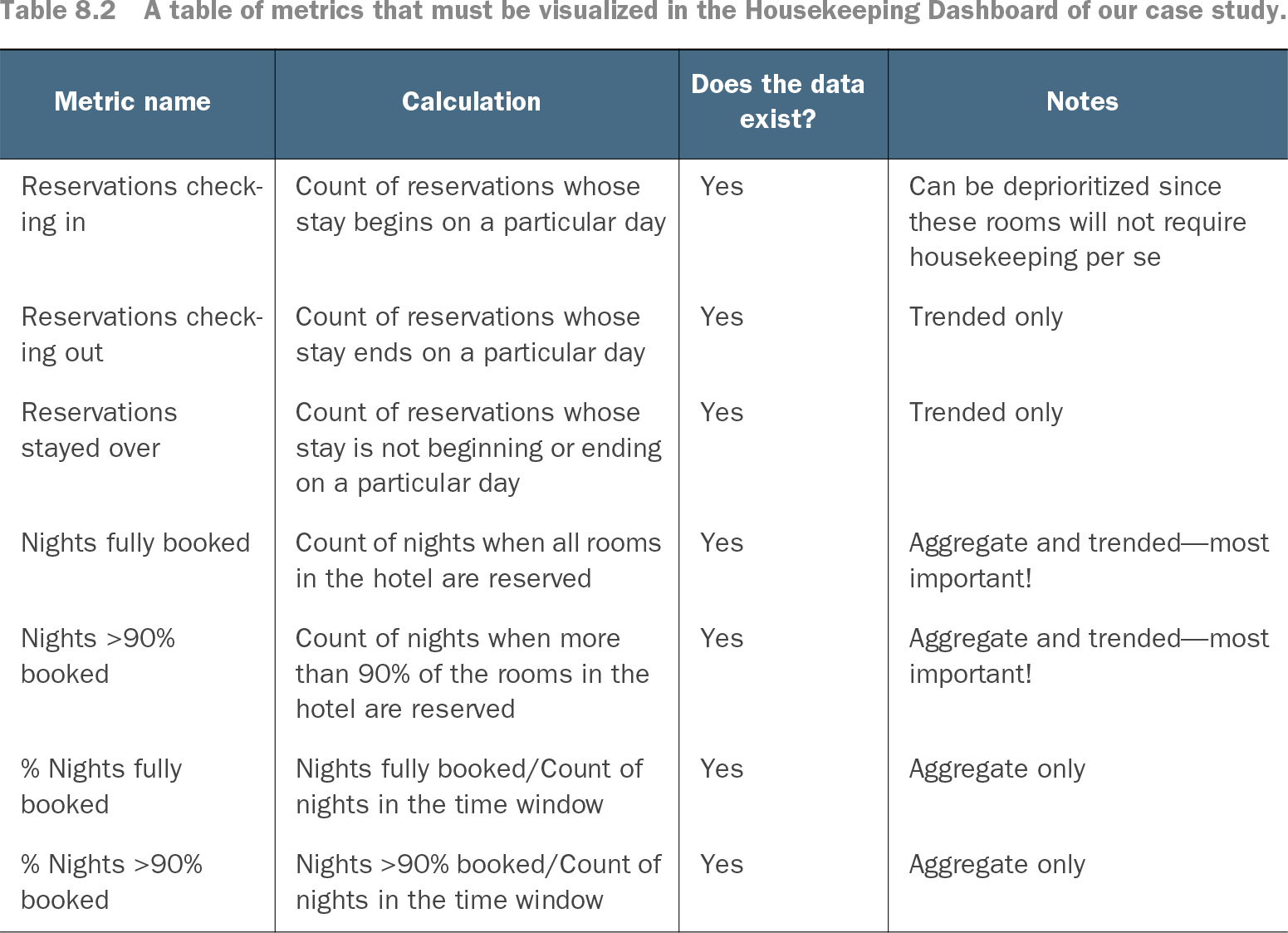
A requirements table can make data assumptions visible before design begins. For a housekeeping dashboard, list each metric, its calculation, whether the data exists, and notes about importance or display—for example, distinguishing trended checkouts from heavily prioritized fully booked nights. section 8.2.3
Approval is not a ceremonial final page. Use the PRD in an iterative cycle: gather feedback, revise when requirements are rejected or changed, and carry the accepted requirements into design, prototypes, and development. Near the deadline, bring it back to feedback sessions as evidence that the agreed work is complete. section 8.4 section 8.4.2
Table 8.2 A table of metrics that must be visualized in the Housekeeping Dashboard of our case study. (view table figure)
Browse the metric table to see how calculations, data availability, and priority notes can turn dashboard needs into reviewable requirements. section 8.2.3