Profiling measures program execution to reveal which code runs, how long methods execute, how often they are invoked, and how CPU or memory resources are consumed. It is especially useful when a debugger cannot explain slowness, freezes, crashes, multithreaded behavior, or unfamiliar code. section 2.3 section 6.4
Use profiling to investigate:
- Resource hogs, including excessive CPU or memory use, memory leaks, and zombie threads. section 5.1 section 5.2.2
- Slow methods, unexpected execution paths, and methods invoked many more times than expected. section 6.0 section 6.2
- SQL queries sent through JDBC, including repeated queries, generated cross joins, execution counts, and the calling stack. section 6.3.1 section 6.3.3
Start with sampling for a lightweight overview: identify executing code, total method time, CPU execution time, or memory-heavy object types. Then restrict instrumentation to the relevant packages, classes, or object types; profiling everything is resource-intensive and can overwhelm the investigation. section 6.4 section 9.2
Diagnosing a faulty producer-consumer application
A Java application starts two producer threads and two consumer threads that concurrently modify an ArrayList without synchronization. VisualVM shows about 50% CPU use unrelated to garbage collection, while the Threads tab reveals active threads. Exceptions eventually stop several threads. Synchronizing both producer and consumer access lowers CPU consumption and changes the memory profile, providing evidence that concurrency errors caused the abnormal behavior. section 5.2.2
Finding a repeated database query
A service loads purchases and then queries product details inside a loop. JDBC profiling reveals that the same query runs ten times. The execution stack identifies the application method responsible, suggesting a single JOIN instead of repeated lookups. Profiling generated criteria-query SQL can likewise expose an unnecessary cross join before it causes serious latency. section 6.3.1 section 6.3.3
Figure 5.4 Using VisualVM to observe the use of CPU resources. The widget in the Monitor tab shows how much CPU the process uses and how much of the usage is caused by the GC. This information helps you to understand whether the app has execution problems and is excellent guidance for the next steps in your investigation. In this particular example, the process spends about 50% CPU. The GC doesn’t affect this value. These signs are often indicators of zombie threads that are usually generated by concurrency problems.
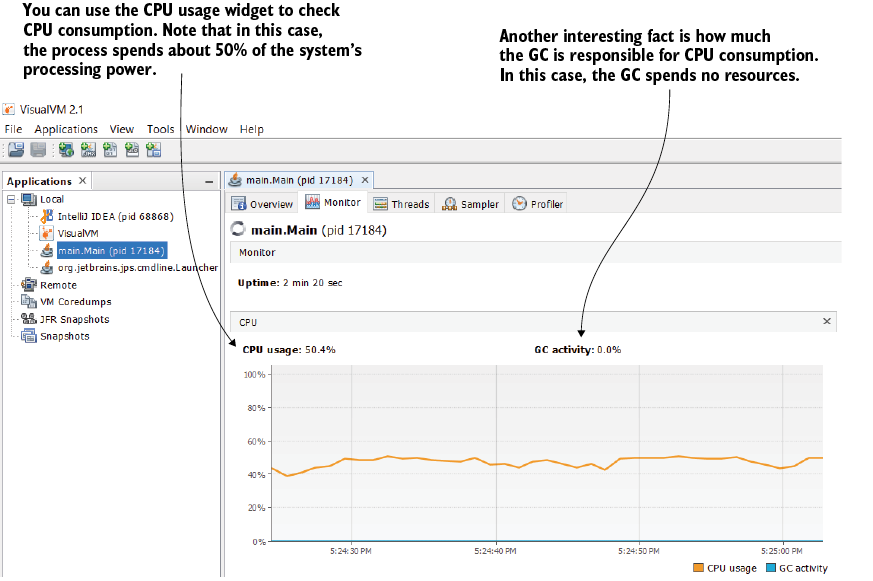
Use the CPU and garbage-collection display to distinguish active execution problems from GC-driven consumption and choose the next investigation step. section 5.2.2










