A programming environment is the workspace used to implement a requirement during the inner loop. It brings together the tools and configuration needed to code, run, test, and debug an application. A poorly aligned setup creates slow feedback, inconsistent results across teammates, and issues that are difficult to reproduce; a well-defined one makes routine changes easier to validate and share. section 1.2.1 section 1.3.2 section 2.2.1
Figure 2.4 The common elements of a development environment: version control system, language runtime pack, container runtime pack, code editor/IDE.
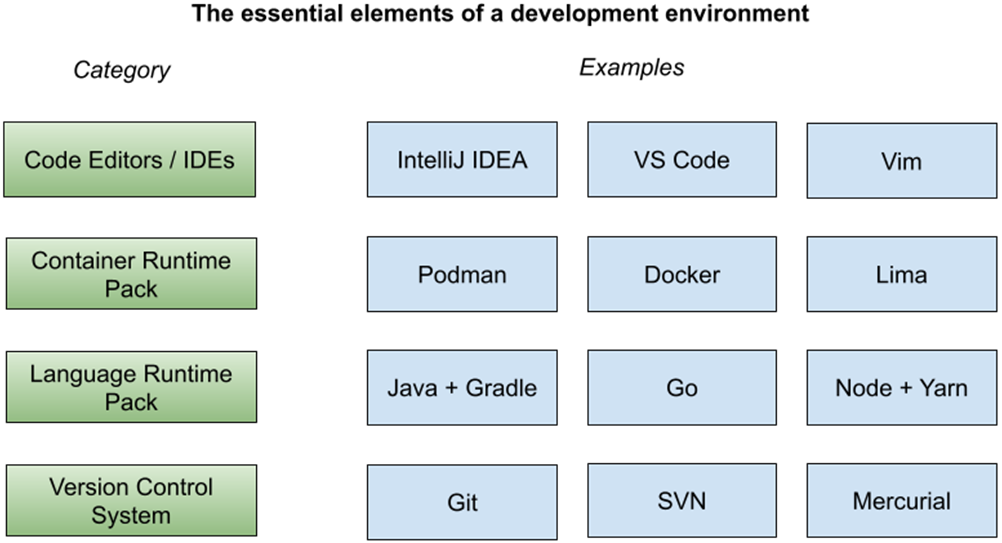
Most environments combine source control, a language runtime pack, a container runtime pack, and an editor or IDE. Projects may add platform SDKs, emulators, external services, and operating-system-specific configuration. section 2.2.1
Treat the environment as a repeatable developer workflow rather than a collection of personal machine instructions:
- Install and configure the required tools, IDE, and local project setup so a developer can begin work without relying on incomplete or outdated manual guidance. section 1.3.2
- Support the full inner-loop sequence: write code, test each change, run it to observe behavior, and debug failures before committing to remote version control. section 1.2.1
- Make required dependencies available locally, including databases or message brokers, while minimizing build and container-image delays that lengthen feedback. section 1.3.5
- Include accessible diagnostics such as logs, traces, metrics, profiling, and network inspection when the application or its services fail locally. section 1.3.6
- Define the setup for reproducibility, automation, portability, isolation, and declarative configuration so teammates and pipeline environments diverge less often. section 1.3.8 section 2.5
Tool choices depend on the application and stack. Git supports collaboration and change tracking; Go may need only its runtime, whereas Java commonly also needs Gradle or Maven. Podman or Docker can run containerized dependencies, and editors range from Visual Studio Code and IntelliJ IDEA to Vim. The goal is not a fixed tool catalog, but a shared setup that fits the project. section 2.2.1
Declarative, activatable workspace
A Flox configuration can declare language tools, dependencies, supported operating systems, and container tooling. Activating it creates an isolated workspace from the manifest; the setup may reuse a host container runtime and can fall back to host tools that were not declared. Separate Go and Java configurations can therefore carry the dependencies each variant needs. section 2.2.6
For cloud-native work, evaluate the environment by its effect on the feedback loop: how quickly a change builds and runs, whether dependent services are available, whether reloads can be automated, and whether local behavior can be compared with pipeline validation. Push small changes frequently so integration feedback arrives before work accumulates. section 1.2.1 section 1.3.5 section 1.3.8