A progressive web app (PWA) is a web application that can be installed and launched outside a browser tab. It uses the browser engine and remains an HTML, CSS, and JavaScript app; installation changes how people launch and use it, not the underlying development stack. PWA describes a widely available user-experience pattern, not a single standard specification. section 2.1.1
Installation provides an app-like starting point, while further capabilities depend on the app and platform:
- An icon and a standalone window make the app accessible outside a browser tab. section 2.1.1
- Offline operation and OS features such as notifications, file handlers, and background sync are optional capabilities. section 2.1.1 section 2.2
Platform labels vary: iOS and iPadOS use “Homescreen Web App,” while macOS and Chrome desktop also use “installed Web App.” Treat support as a progressive enhancement rather than assuming every browser, device, permission, or API is available. section 2.1.1 section 2.2
Squoosh
Squoosh converts and resizes images. It works offline and can be installed on desktop and mobile through options such as “Install,” “Add to Homescreen,” or “Add to Dock.” section 2.1.1
Figure 2.2 This is the open-source PWA image converter Squoosh installed on iOS, macOS, and Android with different browsers and web engines rendering its content in a standalone window.
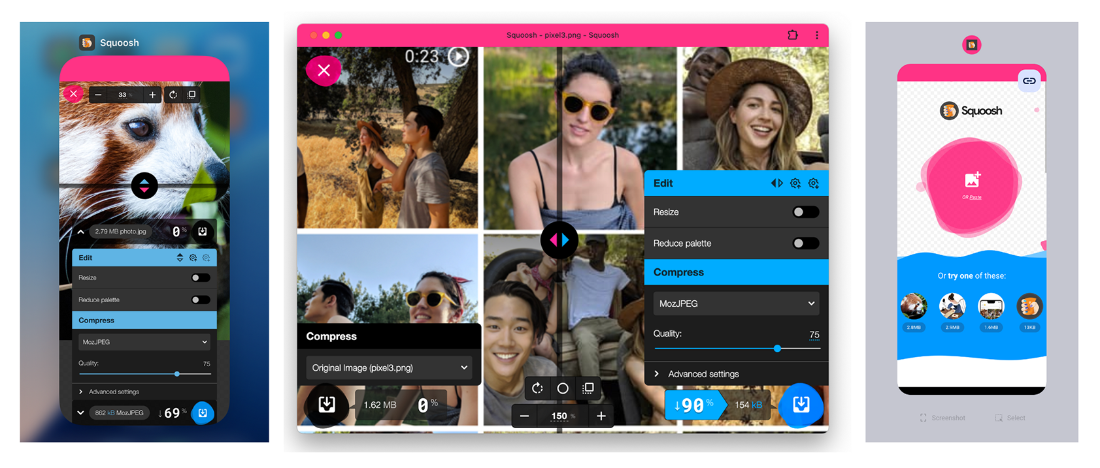
Compare Squoosh installed on iOS, macOS, and Android: different browsers and engines render the same web app in standalone windows. section 2.1.1
