A project activity is a distinct component of work that must be completed in full for the project to be complete. It may also be called a task or subtask, and it can receive attributes such as duration and dependencies during planning. section 13.1
Activities form the units of a work breakdown structure (WBS), which records their organization and dependencies. The WBS provides the foundation for a project plan; later analysis adds times and other attributes for schedule evaluation. section 13.1
Schedule analysis evaluates activities through:
- A forward pass calculates each activity’s earliest start and finish, using the latest earliest finish among multiple predecessors. section 13.3.1
- A backward pass supplies latest start and finish times for comparison with earliest times. section 13.3.3
- Slack measures allowable delay; activities with zero slack are on the critical path, while activities with slack are noncritical. section 13.3.3
Automated reporting tool
A WBS decomposes the project into activities A–L, from defining objectives and assembling the team through testing and deployment. Dependencies determine execution order; the forward-pass network produces a 29-week project timeline, and CPM identifies which activities have zero slack. section 13.1 section 13.3.1 section 13.3.3
Table 13.1 WBS for completing the automated reporting tool project. It includes an outline of the key activities required, along with brief descriptions and their respective dependencies. Each activity is identified by a unique code and details the necessary steps and preceding tasks needed for successful project completion.
|
Activity
|
Description
|
Dependencies
|
|---|---|---|
|
A
|
Define Project Objectives and Scope
|
None
|
|
B
|
Assemble Project Team
|
A
|
|
C
|
Gather Requirements from Stakeholders
|
A, B
|
|
D
|
Data Collection and Integration
|
C
|
|
E
|
Data Cleaning and Preprocessing
|
D
|
|
F
|
Design Report Templates
|
C
|
|
G
|
Develop Data Processing Pipelines
|
E
|
|
H
|
Implement Report Gathering Logic
|
F
|
|
I
|
Develop User Interface for Report Access
|
F
|
|
J
|
Integrate Data Pipelines with Report Generation
|
G, H
|
|
K
|
Conduct User Testing and Feedback
|
I, J
|
|
L
|
Finalize and Deploy Automated Reporting Tool
|
K
|
Use the WBS table to inspect activity identifiers, descriptions, and predecessor dependencies for the automated reporting tool project. section 13.1
Figure 13.2 A visual representation of the automated reporting tool project plan, where each activity is represented by its unique identifier. Lines and arrows between activities represent dependencies. The sequence of digits immediately beneath each activity represents, in order, the activity’s earliest start time, expected duration, and earliest finish time. The earliest times are derived by using a forward pass through the network. Based on this analysis, the project timeline is 29 weeks, which is the length of the longest path in the network.
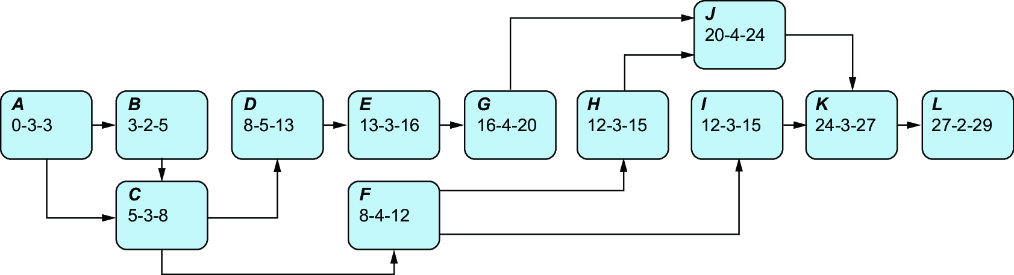
Use the network figure to follow activity dependencies and compare earliest start, duration, and earliest finish values. section 13.3.1
Table 13.3 CPM results for the automated reporting tool project. Activities in any project have slack or no slack, which is derived by subtracting the earliest start from the latest start or, alternatively, by subtracting the earliest finish from the latest finish (it doesn’t matter). Activities with no slack are on the critical path, whereas activities with slack are not.
|
Activity
|
Earliest start (ES)
|
Earliest finish (EF)
|
Latest start (LS)
|
Latest finish (LF)
|
Slack (LS – ES)
|
Critical path?
|
|---|---|---|---|---|---|---|
|
A
|
0
|
3
|
0
|
3
|
0
|
Yes
|
|
B
|
3
|
5
|
3
|
5
|
0
|
Yes
|
|
C
|
5
|
8
|
5
|
8
|
0
|
Yes
|
|
D
|
8
|
13
|
8
|
13
|
0
|
Yes
|
|
E
|
13
|
16
|
13
|
16
|
0
|
Yes
|
|
F
|
8
|
12
|
13
|
17
|
5
|
No
|
|
G
|
16
|
20
|
16
|
20
|
0
|
Yes
|
|
H
|
12
|
15
|
17
|
20
|
5
|
No
|
|
I
|
12
|
15
|
21
|
24
|
9
|
No
|
|
J
|
20
|
24
|
20
|
24
|
0
|
Yes
|
|
K
|
24
|
27
|
24
|
27
|
0
|
Yes
|
|
L
|
27
|
29
|
27
|
29
|
0
|
Yes
|
Use the CPM table to compare earliest and latest times, calculate slack, and locate critical-path activities. section 13.3.3
