PromQL is Prometheus’s query language for exploring, filtering, aggregating, and transforming time-series metrics. It helps inspect how ScyllaDB performance changes over time, using metrics collected from configured targets. section 11.1.2 section 11.4
A practical PromQL workflow includes:
- Open Prometheus’s query window at http://localhost:9090 after checking that configured targets are online. section 11.1.2
- Select a metric such as scylla_storage_proxy_coordinator_read_latency_sum and use labels to filter or distinguish metric series. section 11.1.2 section 11.4
- Aggregate values across nodes or series with functions, then use the result to observe performance over time. section 11.1.2 section 11.4
Calculating average read latency
Start with the total read-latency metric: scylla_storage_proxy_coordinator_read_latency_sum. Aggregate it with sum(...), then divide by the aggregated read count: sum(scylla_storage_proxy_coordinator_read_latency_sum) / sum(scylla_storage_proxy_coordinator_read_latency_count). This produces a query for average read latency, a useful indicator of database performance. section 11.1.2
Figure 11.3 PromQL combines metrics, labels, functions, and recording rules to help you query and transform ingested metrics.
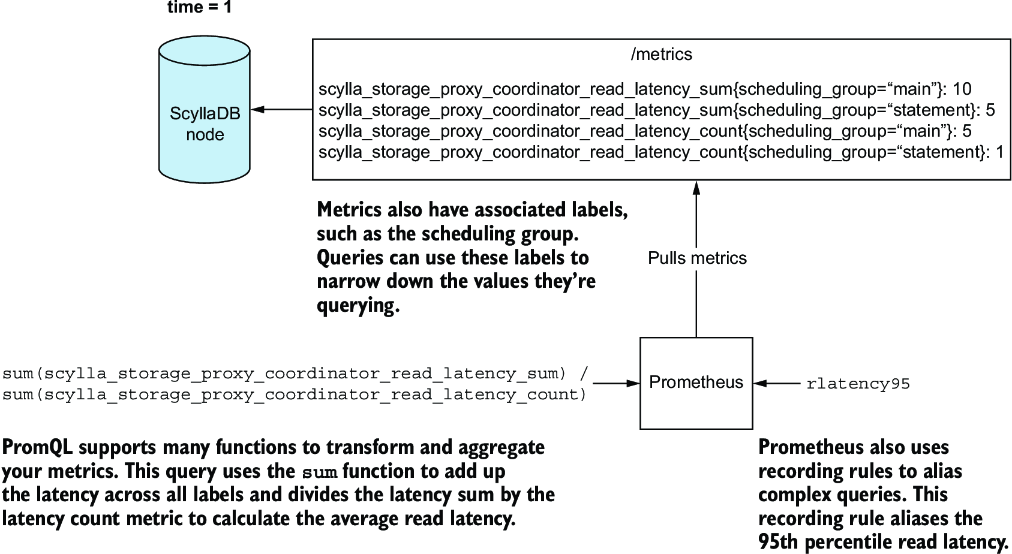
Use the figure to see how PromQL combines metrics, labels, functions, and recording rules into queries and transformations. section 11.1.2



