Prototyping turns a design idea into an early, testable version before anyone commits to the real thing. A prototype is for exploring concepts, demonstrating options, and learning what works—not for production. It can be a sketch brought to life in a visualization tool, a rough dashboard, or any functional experiment that gets an idea out of someone’s head and onto the screen. section 8.3.2 section 8.4.1
Keep it deliberately rough. Code may be hacked together, data may be incomplete, and visual polish can wait; the useful question is whether the prototype runs and tests the intended idea. Starting directly in a tool is a fine alternative to sketching, especially when real data reveals how visuals will behave, but pixel-perfect work this early wastes development time. section 8.3.2 section 8.4.1
A practical dashboard prototype usually involves a few simple moves:
- Use real data when it is available, or substitute data with a similar structure and appearance. section 8.4.1 section 9.5
- Build enough of the layout and interactions to test whether the idea is possible. section 8.3.2 section 8.4.1
- Show the working version to users and stakeholders, then revise from their feedback. section 8.4 section 8.4.1
Settling a dashboard disagreement
When wireframes did not convince skeptical stakeholders, a quick prototype using their real data made an alternative dashboard design tangible. Seeing a functional version changed the discussion: the stakeholders preferred the prototype’s approach, even though the final dashboard later evolved from it. section 9.2.2 section 9.5
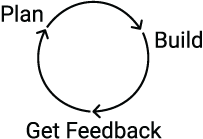
Use the iterative cycle as a reminder that a prototype is a build within a repeating loop: plan, build, get feedback, and repeat. section 8.4







