PyArrow provides Python bindings for Apache Arrow, an efficient in-memory data format designed to work across pandas, R, Apache Spark, and other systems. section 12.4
For pandas workflows, PyArrow can accelerate CSV loading, support compact binary formats, and provide an alternative storage backend to NumPy. section 12.0 section 12.4
The main performance-oriented uses are:
- Load CSV data through pandas with the PyArrow engine; reported loading was substantially faster than pandas’ built-in engine. section 12.4
- Store data in Feather or Parquet, binary formats intended to reduce disk usage and improve read and write speed. section 12.4
- Use nullable Arrow data types, including integer columns that can contain missing values without becoming floating-point columns. section 12.4
Speed up a pandas CSV load
filename = '../data/olympic_athlete_events.csv'
df = pd.read_csv(filename, engine='pyarrow')
For a binary workflow, write the resulting data frame with df.to_feather('mydata.feather'), then load it with pd.from_feather('mydata.feather'). section 12.4
Select an Arrow-backed dtype
df = pd.read_csv(filename, dtype_backend='pyarrow')
This pandas 2.0-era option uses PyArrow for backend storage instead of NumPy. section 12.4
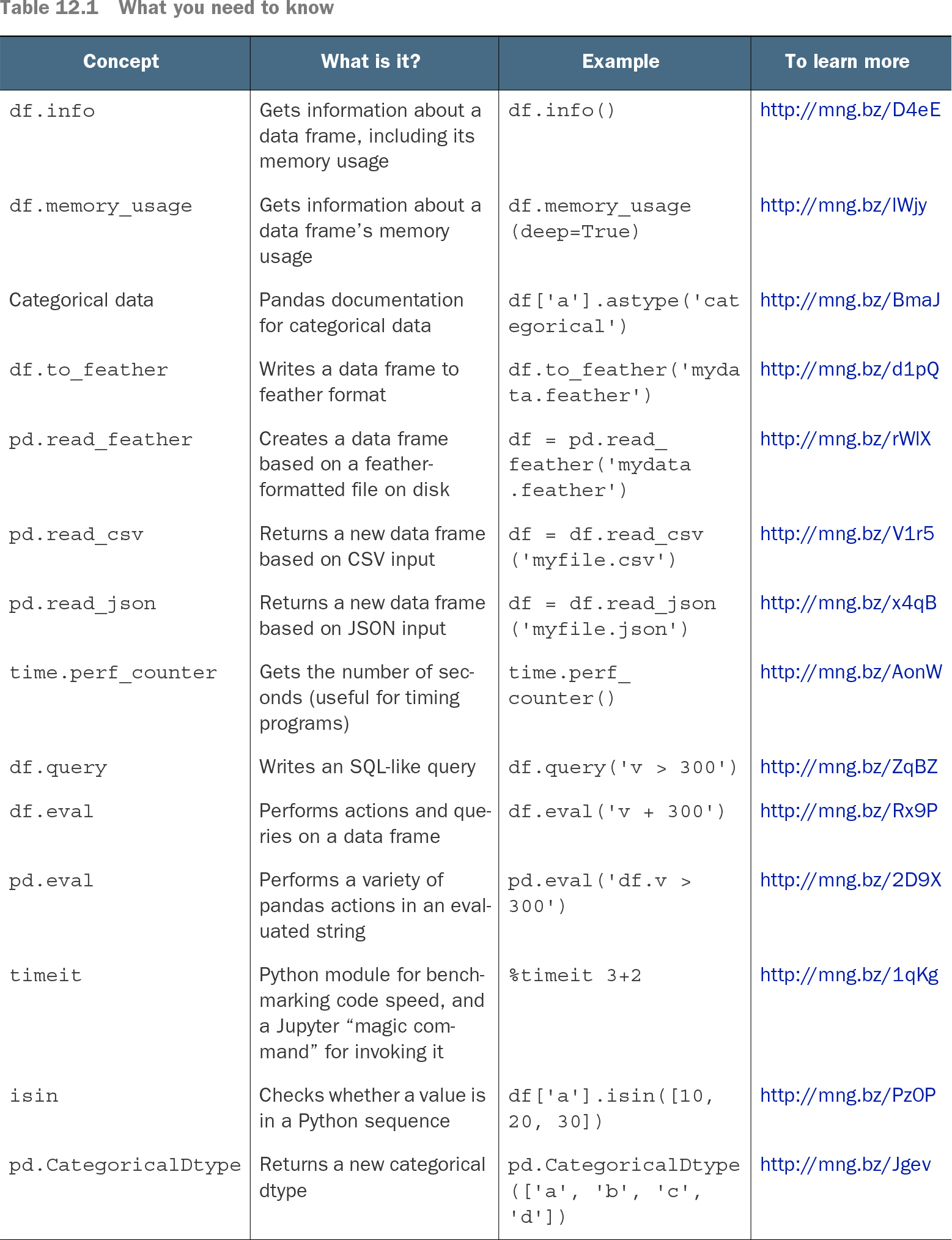
| Concept |
What is it? |
Example |
To learn more |
| df.info |
Gets information about a data frame, including its memory usage |
df.info() |
http://mng.bz/D4eE |
| df.memory_usage |
Gets information about a data frame’s memory usage |
df.memory_usage (deep=True) |
http://mng.bz/lWjy |
| Categorical data |
Pandas documentation for categorical data |
df['a'].astype ('categorical') |
http://mng.bz/BmaJ |
| df.to_feather |
Writes a data frame to feather format |
df.to_feather ('mydata.feather') |
http://mng.bz/d1pQ |
| pd.read_feather |
Creates a data frame based on a feather-formatted file on disk |
df = pd.read_feather ('mydata.feather') |
http://mng.bz/rWlX |
| pd.read_csv |
Returns a new data frame based on CSV input |
df = df.read_csv ('myfile.csv') |
http://mng.bz/V1r5 |
| pd.read_json |
Returns a new data frame based on JSON input |
df = df.read_json ('myfile.json') |
http://mng.bz/x4qB |
| time.perf_counter |
Gets the number of seconds (useful for timing programs) |
time.perf_counter() |
http://mng.bz/AonW |
| df.query |
Writes an SQL-like query |
df.query('v > 300') |
http://mng.bz/ZqBZ |
| df.eval |
Performs actions and queries on a data frame |
df.eval('v + 300') |
http://mng.bz/Rx9P |
| pd.eval |
Performs a variety of pandas actions in an evaluated string |
pd.eval('df.v > 300') |
http://mng.bz/2D9X |
| timeit |
Python module for benchmarking code speed, and a Jupyter “magic command” for invoking it |
%timeit 3+2 |
http://mng.bz/1qKg |
| isin |
Checks whether a value is in a Python sequence |
df['a'].isin ([10, 20, 30]) |
http://mng.bz/Pz0P |
| pd.CategoricalDtype |
Returns a new categorical dtype |
pd.CategoricalDtype (['a', 'b', 'c', 'd']) |
http://mng.bz/Jgev |
Use the reference table to compare PyArrow-related file operations with pandas memory and input/output methods. section 12.0