Query profile is a Snowflake performance-investigation tool. It renders a query’s execution plan graphically and exposes statistics that explain how execution proceeded. Open it after a query runs to move from a slow query’s elapsed time to the plan nodes and measurements behind that result. section 8.2.3 section 8.7
In Snowsight, locate the Query ID in the Query Details pane, then select its link or choose View Query Profile. The profile opens separately and can include a graphical plan, Most Expensive Nodes, Profile Overview, and Statistics panes; the available details vary with query type and complexity. section 8.2.3
Figure 8.4 Query Profile showing the graphical representation of the query execution plan, the Most Expensive Nodes pane, the Profile Overview pane, and the Statistics pane
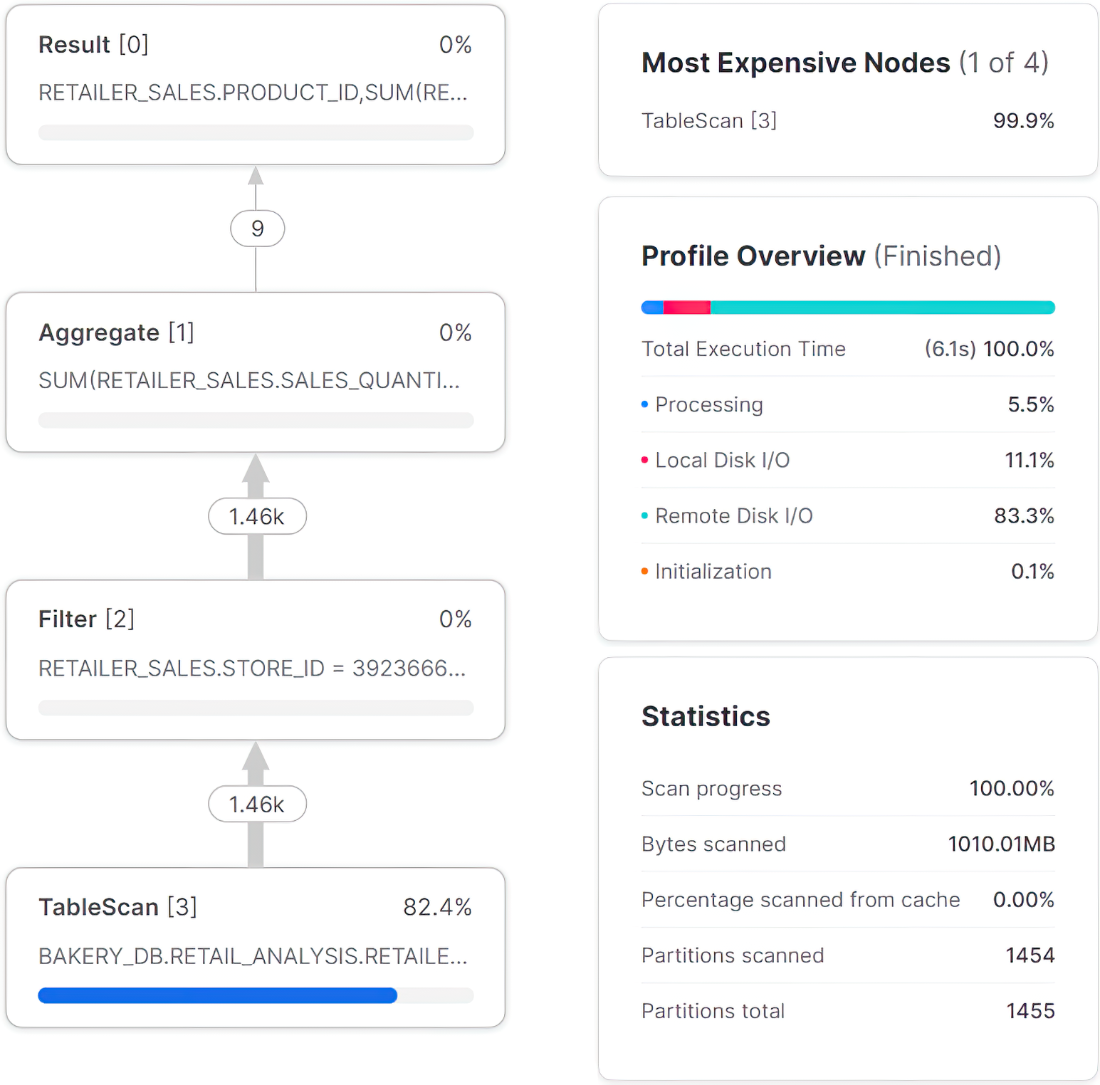
Use the profile layout to relate costly plan nodes to overview timing and query statistics. section 8.2.3
Use query profile as part of an optimization workflow:
- Start with query history to find long-running queries, using elapsed time as an initial ranking signal. section 8.6.2
- Compare scanned and total partitions to determine whether micro-partition pruning was applied. section 8.6.2
- Open the selected query by its Query ID and inspect its execution mechanics before changing SQL or storage design. section 8.6.2 section 8.6.1
- Review micro-partition pruning, data caching, and data spilling when those scenarios materially affect performance. section 8.2.3
Comparing warehouse executions
Run the same analytical query on an extra-small virtual warehouse, then inspect Profile Overview and Statistics. Record Total Execution Time and Bytes spilled to local storage; the illustrated extra-small run reports 22 seconds and 36.86 MB spilled. These measurements support a concrete comparison of warehouse sizing and execution behavior. section 9.2
Query profile complements SQL simplification rather than replacing it. Reduce data before complex operations, avoid needless nested subqueries and ORDER BY clauses, use UNION ALL for disjoint results, and avoid unnecessary DISTINCT; then use the profile to understand the resulting execution mechanics. section 8.6.1
