Query statistics measure execution behavior and resource consumption. In Snowflake, the query profile combines an execution-plan graphic with statistics selected for the query’s type and complexity. section 8.2.3
Use the query profile to inspect performance signals such as:
- Micro-partition pruning, which shows whether unnecessary storage partitions can be excluded. section 8.2.3
- Data caching and data spilling, which indicate additional execution behaviors affecting performance. section 8.2.3
- Total execution time and bytes spilled to local storage, useful when comparing warehouse performance. section 9.2
Comparing warehouse performance
After running a sales aggregation on the BAKERY_WH_XSMALL warehouse, inspect the Query ID, open View Query Profile, and record Total Execution Time and Bytes spilled to local storage. One observed run took 22 seconds and spilled 36.86 MB. section 9.2
Figure 8.4 Query Profile showing the graphical representation of the query execution plan, the Most Expensive Nodes pane, the Profile Overview pane, and the Statistics pane
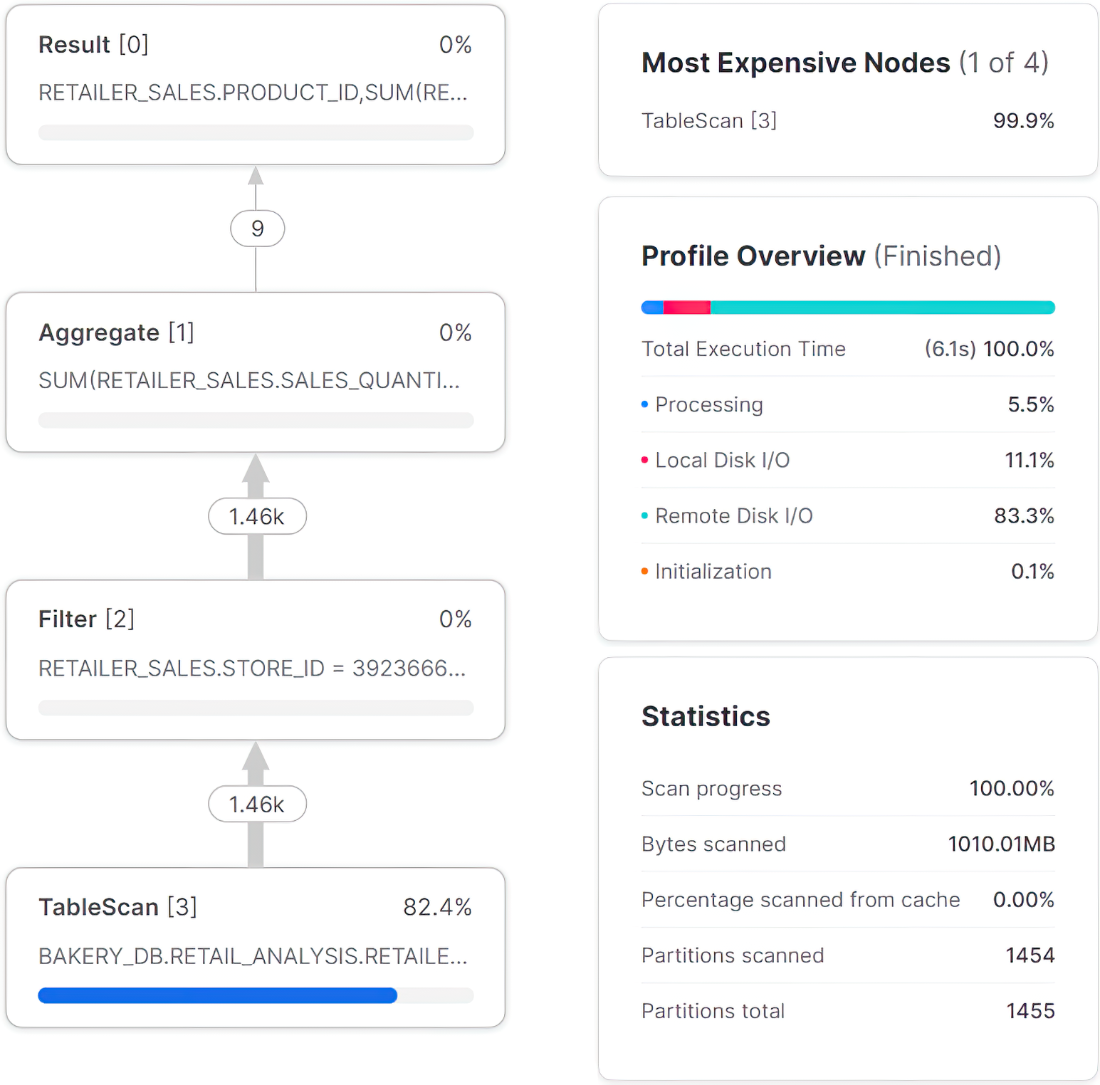
Inspect the query profile’s execution-plan graphic, Most Expensive Nodes, Profile Overview, and Statistics panes. section 8.2.3
