RabbitMQ is an AMQP message broker for asynchronous communication. A producer sends a message to an exchange with a routing key; the exchange routes it to one or more queues according to its bindings. A consumer reads from a queue, not from the exchange. section 9.2
Figure 9.2 Messages sent to a RabbitMQ exchange are routed to one or more queues, based on routing keys and bindings.
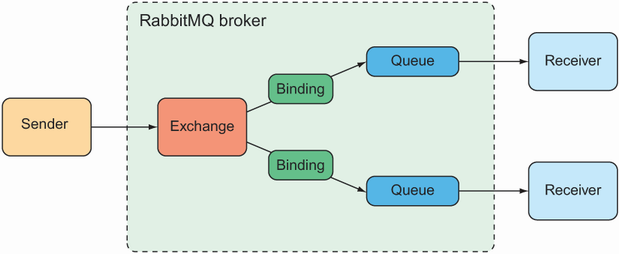
Follow a message from the exchange to its bound queues. The routing key helps determine which queues receive it. section 9.2
Choose an exchange to suit the routing job:
- Default routes to the queue named by the routing key; every queue is bound to it automatically. section 9.2
- Direct matches a routing key to a binding key; topic also allows wildcard matches. section 9.2
- Fanout sends to every bound queue, regardless of routing keys; headers routes by message headers. section 9.2
In a Spring Boot application, add spring-boot-starter-amqp. Autoconfiguration supplies an AMQP connection factory and RabbitTemplate. A local development broker commonly uses localhost:5672; set spring.rabbitmq.host, port, username, and password when a deployed broker needs different connection details. section 9.2.1
Send a taco order
Inject RabbitTemplate into an order-messaging service. Call rabbit.convertAndSend("tacocloud.order", "kitchens.central", order) to convert the order and send it using an exchange and routing key. The message reaches a queue only if the exchange’s bindings route it there. Use send() instead when supplying a Message yourself; a MessagePostProcessor can add headers before sending. section 9.2.2 section 9.2
Receive an order
A kitchen can pull from a queue with rabbit.receiveAndConvert("tacocloud.order.queue"), or handle pushed orders in a method annotated @RabbitListener(queues = "tacocloud.order.queue"). A pull with the default zero-millisecond timeout can return immediately with null; even a longer timeout requires null handling. section 9.2.3




