A radial scale maps a continuous value to the radius of a graphical mark such as a circle. In D3, create one with d3.scaleRadial(), then give it a numeric domain and a radius range in pixels. Use it when circle size represents a quantity: the scale accounts for the fact that viewers perceive a circle through its area, not just its radius. section 7.5 section 7.4.1
Start by finding the largest value in the data. Map zero and that maximum to a practical radius range, then call the scale for each datum when setting an SVG circle’s r attribute. Keep the radius range small enough that large marks do not hide nearby marks. section 7.4.1 section 11.3.2
Figure 7.17 Weight of the cetacean represented by circles. On the left, the circles are sized with a linear scale, while on the right, we used a radial scale. Note how the linear scale creates a visual distortion by exaggerating the differences between the area of the circles for each weight.
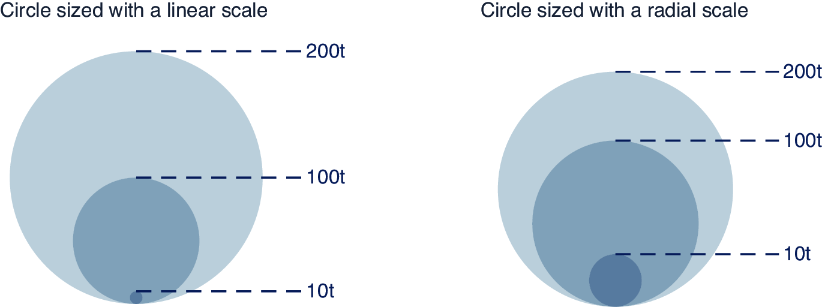
Compare linear and radial sizing before choosing a circle scale. A linear radius scale can exaggerate differences in circle area, while a radial scale gives quantities a more appropriate visual comparison. section 7.4.1
Size circles in a scatterplot
For a cetacean scatterplot, calculate the maximum weight, map weights from 0 to that maximum onto radii from 0 to 45, and use the resulting radius for each species circle. Other scales can independently place the circle and assign its color. section 7.4.1
Reuse radius logic for mapped or hierarchical data
Wrap scaleRadial() in a helper when the maximum arrives with loaded data. A tree uses speaker totals for leaf-node radii; a map uses each city’s laureate count for its circle radius after geographic projection determines position. section 11.3.2 section 13.2.4
