A radial visualization, or radial chart, arranges marks around a center using angular and radial coordinates. Polar coordinates and trigonometric functions determine where visualization elements appear. section 14.7
Build a radial visualization by moving from data preparation to visible elements:
- Gather, clean, and explore the data before identifying quantitative and qualitative attributes. section 14.7
- Sketch the layout, build the project skeleton, and select implementation methods from the relevant D3 modules. section 14.7
- Calculate each element’s angular position and radial endpoint with basic trigonometric functions. section 14.5.4 section 14.7
- Add interactions after implementing the visualization elements, guided by the questions users want to answer. section 14.7
Monthly letters as a radial bar chart
A Van Gogh visualization maps the number of letters written each month to radial bar endpoints. The letters dataset is loaded into Grid.svelte, passed through GridItem.svelte, and rendered by a Letters component using data and scales. The completed layout combines the chart with a timeline. section 14.5.4
Number of letters written by Van Gogh over the course of the year 1885
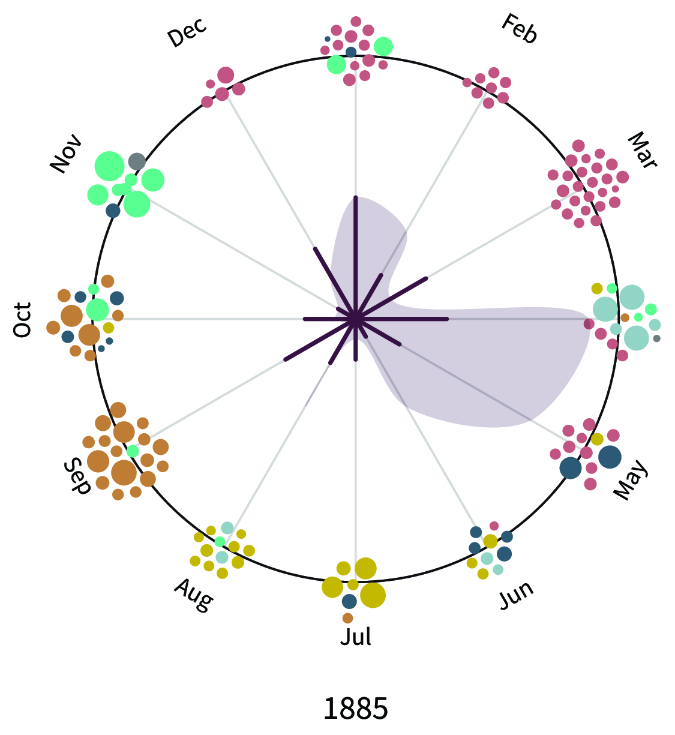
Inspect the completed radial chart showing the number of letters written by Van Gogh during 1885. section 14.5.4
