A polar coordinate system locates a point with two dimensions: its radius, the distance from the origin, and its angle, measured clockwise from 12 o’clock. It is especially useful for positioning arcs, whose origin sits at the center of an SVG chart. section 4.4.1 section 4.5
Build a radial visualization by following these steps:
- Append an SVG group and translate it to the chart center, making the group origin the polar-coordinate origin. section 4.4.1
- Convert a data proportion into an angle, then convert degrees to radians because D3’s arc generator expects radians. section 4.4.1 section 4.5
- Configure d3.arc() with inner and outer radii, optionally adding corner rounding and padding between arcs. section 4.4.2
- Pass each arc’s startAngle and endAngle to generate the SVG path’s d attribute. section 4.4.2
Precipitation ratio donut
For 2021, filter 365 daily records to find 126 days with precipitation, round the ratio to 35%, and draw one arc from 0 to 35% of 2π. Draw the second arc from that angle to 2π to represent days without precipitation. section 4.4.1
Figure 4.24 The dimensions of a Cartesian coordinate system are perpendicular to one another, while the polar coordinate system uses the radius and angle dimensions to describe a position in space.
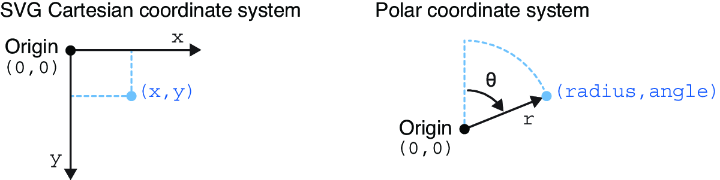
Compare Cartesian coordinates, which use perpendicular x and y dimensions, with polar coordinates, which use radius and angle. section 4.4.1
Figure 4.25 We facilitate the creation of a set of arcs by wrapping them into an SVG group and translating this group to the center of the SVG container. When we append arcs to the group, their position will be automatically relative to the center of the chart, which corresponds to the origin of their polar coordinate system.
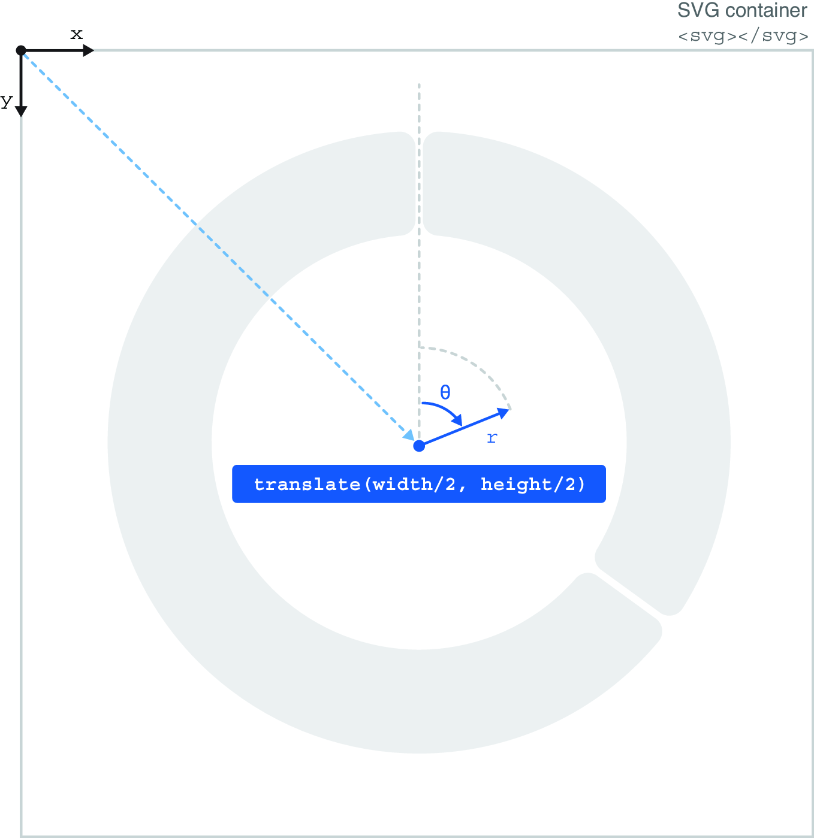
See how translating an SVG group to the chart center makes appended arcs position themselves relative to the polar origin. section 4.4.1
