Use random_string when a Terraform resource needs a compact, non-sensitive random suffix to satisfy naming constraints. It is especially useful for resources that are difficult to recreate or require globally unique names. section 10.1.2
Add a random secret suffix
resource "random_string" "suffix" { length = 6 special = false upper = false } resource "aws_secretsmanager_secret" "main" { name = "${var.name}-${random_string.suffix.result}" } This keeps the configured prefix readable while adding six lowercase, non-special characters. The result is referenced through random_string.suffix.result. section 10.1.2
Prefer random_string here over random_id because it fits more randomness into fewer characters, and over random_password because it does not mark names as sensitive. Encapsulate resource-specific naming rules inside modules so callers do not manage them manually. section 10.1.2
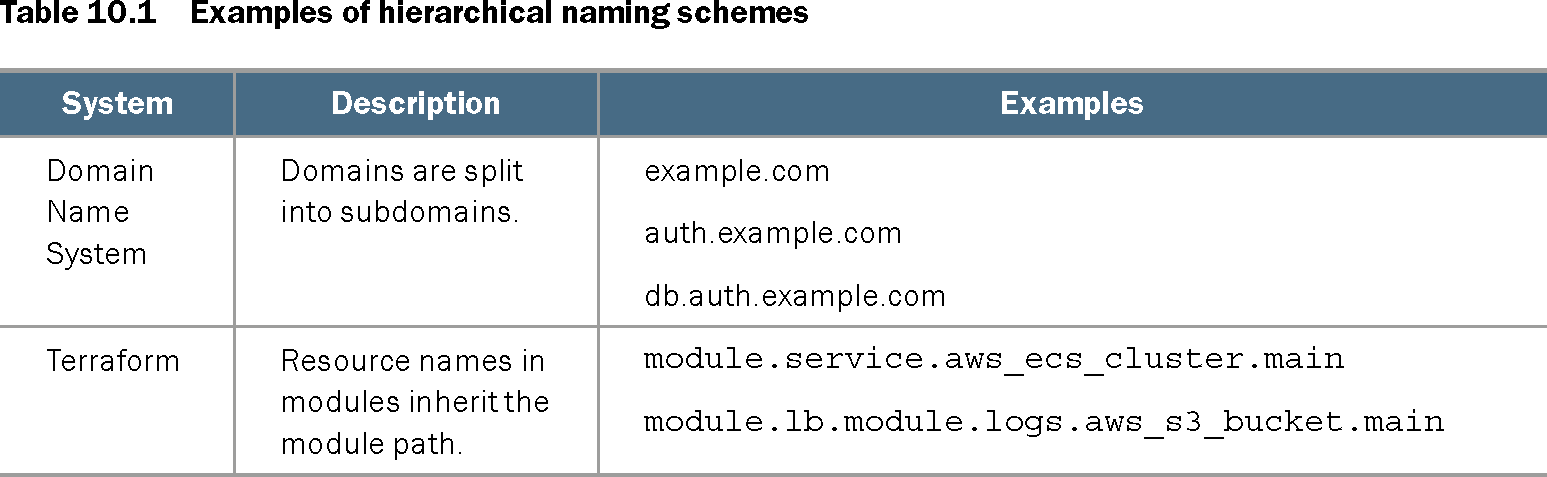
Table 10.1 Examples of hierarchical naming schemes (view table figure)
| System |
Description |
Examples |
|---|---|---|
| Domain Name System |
Domains are split into subdomains. |
example.com auth.example.com db.auth.example.com |
| Terraform |
Resource names in modules inherit the module path. |
module.service.aws_ecs_cluster.main module.lb.module.logs.aws_s3_bucket.main |
Compare hierarchical Terraform names with DNS-style naming to see how module paths and descriptive prefixes organize resources. section 10.1.2