A single density threshold may split one useful group while merging two others. A reachability plot makes that trade-off visible: it places points in the order OPTICS processes them and plots each point’s reachability distance. Changes in the plotted heights reveal where cluster boundaries may fall. section 12.4.2 section 12.4.4
OPTICS takes minPoints and a maximum neighborhood radius εMAX. It builds an ordering and reachability distances, using a priority queue to track tentative distances until points are processed. A point starting a new region can have an undefined distance or one above εMAX. The plot uses the resulting order and distances; choosing clusters is a separate step. section 12.4.2 section 12.4.3
Figure 12.17 A reachability plot. The top chart shows the clustered dataset, the bottom half the reachability distances of points in the dataset, in the same order as points are processed by OPTICS. Outliers are shown in black (with an X marker in the top plot); clusters are assigned the same shade (or color, if you are reading the digital version) in both charts (dashed lines link clusters across the charts). The reachability distances are computed by OPTICS given parameters minPoints and ϵMAX. Further, there is a parameter ϵ that determines the cutoff point for reachability distances and therefore the actual partitioning into clusters.
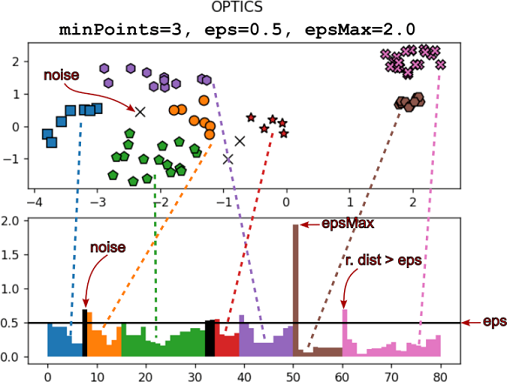
Compare the dataset above with its ordered distances below. Matching colors connect the chosen flat clusters to their portions of the plot; black marks outliers. section 12.4.2
To obtain a flat clustering, choose ε ≤ εMAX and scan the ordered distances against that cutoff. This sets the core-region radius, equivalent to choosing that radius for DBSCAN. An undefined distance or one above ε signals a possible boundary; a distance at or below ε can continue a cluster. A high point is not automatically noise: the cluster-extraction step also considers the following points. The illustrated plot substitutes εMAX for undefined outlier distances so they can be drawn. section 12.4.3 section 12.4.3
Changing the cutoff
Increasing ε on the same OPTICS results forms fewer clusters. At ε = 0.7 in the illustrated dataset, it joins a desired pair on the left but also merges two clusters on the right. The intervening peaks show why one global cutoff cannot make every desired separation. section 12.4.4
Use the plot to inspect several cutoffs rather than treating one partition as inevitable. For a multi-layer view, a dendrogram built from the OPTICS results shows cluster mergers across thresholds and can be cut at different heights in different branches. Building the ordering requires the OPTICS computation; extracting one flat partition then scans the ordered points and stores their cluster assignments. section 12.4.4 section 12.4.3
