liveBook · Manning

React Developer Tools

As explained in React Quickly, Second Edition

React Developer Tools is a browser developer extension for inspecting React component trees, props, state, and rendering behavior.

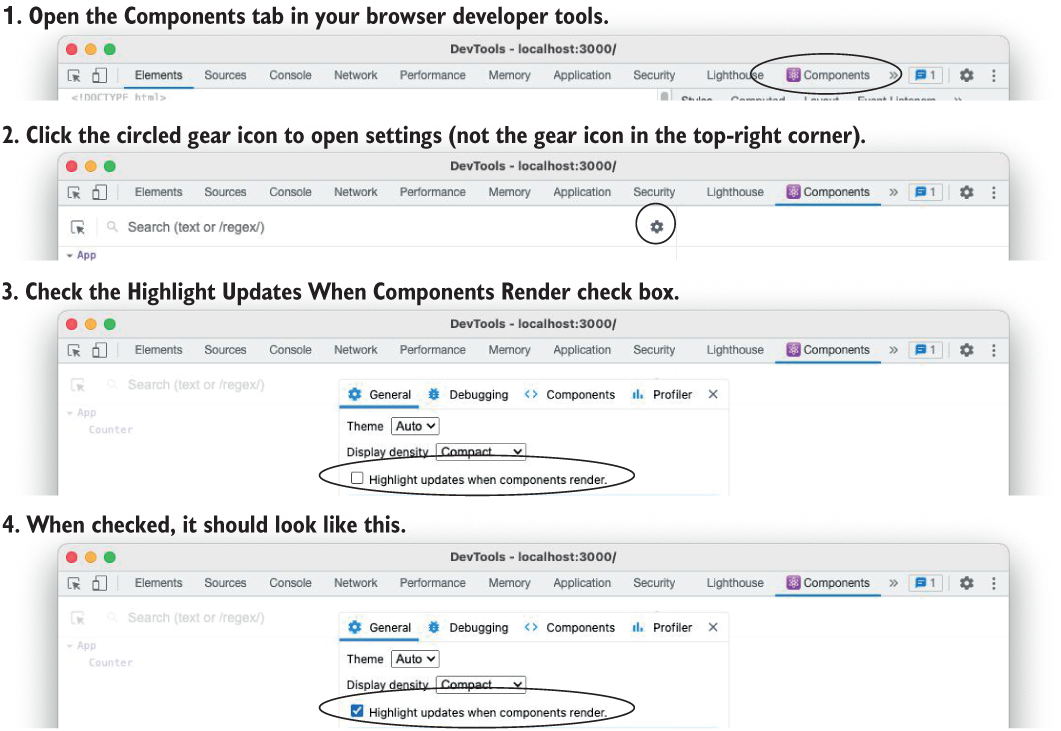
React Developer Tools is a browser developer extension for inspecting React components and observing when they render. Enable Highlight Updates When Components Render in the Components panel to diagnose state-driven updates. section 5.2.5

Use the extension to check whether:

  • A counter re-renders after incrementing or resetting. section 5.2.5
  • Resetting an already-zero value produces no visible render highlight. section 5.2.5
  • A to-do list fails because code mutates an array and passes the same reference back to state. section 5.2.5
Figure 5.25 Open the Components panel for React Developer Tools, open the gear menu, and select the Highlight Updates When Components Render check box.
05-25

Follow the interface steps for opening Components, locating the gear menu, and enabling render highlights. section 5.2.5


How React Quickly, Second Edition covers it

How deep it goes
Shows render highlighting and explains unchanged state references, but does not detail broader profiling workflows.
Examples
Uses a resettable counter and broken versus corrected to-do lists to expose rendering behavior.
What it assumes
Assumes familiarity with React components, state, and re-rendering.
What you can do after
Diagnose/debug with it: identify whether state changes trigger component renders.
How it connects
Connects component rendering, state updates, and referential equality.

Also explained in

Compare how 2 books explain React Developer Tools →

Related concepts

This explainer was generated by Manning's knowledge graph from the text of React Quickly, Second Edition. The section links point to the parts of the book it draws on.