A security recommendation identifies a misconfiguration or weakness in an Azure resource and gives concise remediation guidance. Microsoft Defender for Cloud generates recommendations using the Microsoft Cloud Security Benchmark (MCSB), aligned with NIST, CIS, and PCI DSS controls. section 6.2.2
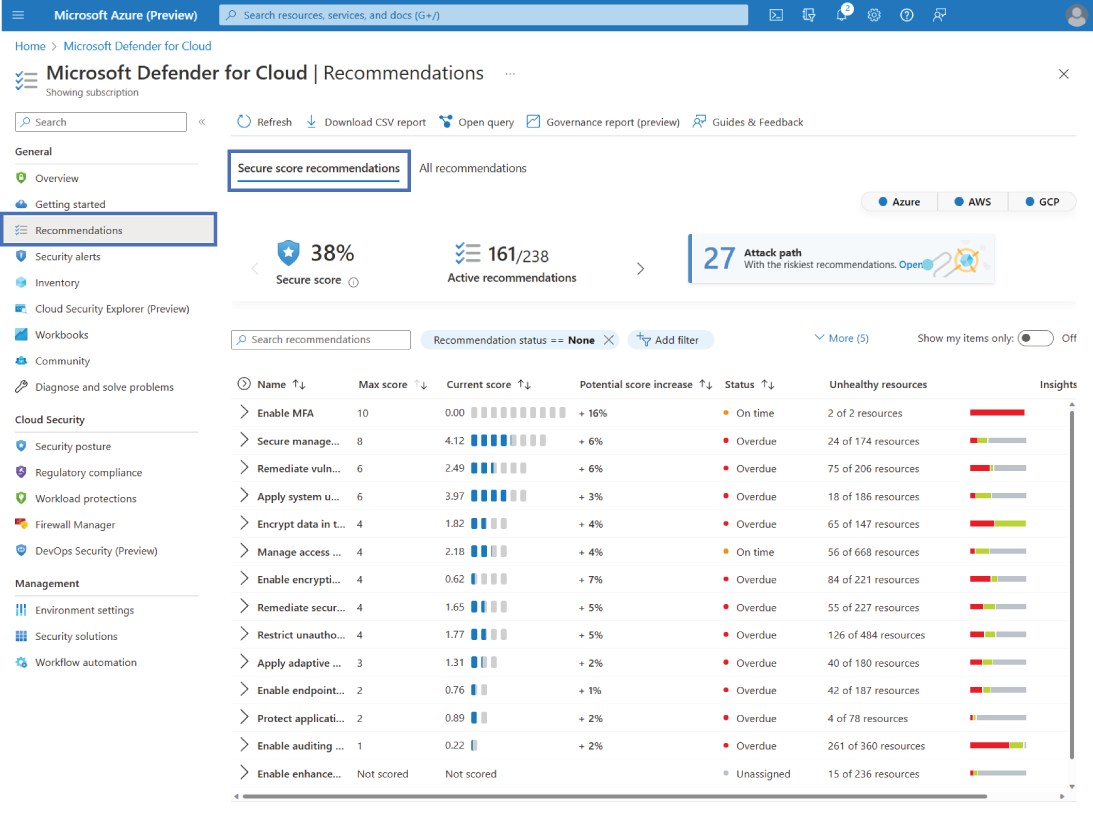
Use the Recommendations view to review detected issues across an onboarded subscription. Prioritize work with Potential Score Increase to focus first on changes that most improve security posture. section 6.2.2
Recommendations and secure score are available without additional cost after onboarding Azure subscriptions to Defender for Cloud. Secure score aggregates security findings from 0% to 100%; following recommendations under a control raises the score, while preview recommendations do not yet count. section 6.2.3 section 6.2.4
Turn guidance into accountable remediation:
- Open a recommendation, inspect its unhealthy resources and remediation steps, implement the fix, then check again after the stated freshness interval. section 6.7
- Assign an owner, due date, and optional grace period to each affected resource; the grace period prevents score impact until the due date. section 6.4.1
- Use governance rules to assign owners by resource tag and set 7-, 14-, 30-, or 90-day remediation timeframes across selected scopes. section 6.4.3
- Automate a Logic App response by using recommendation name, severity, state, or regulatory-control conditions as workflow triggers. section 7.4.1
VM system updates campaign
A governance rule can target “System Updates Should Be Installed on Your Machines,” select an owner from a resource tag, allow 14 days for remediation, and retain a grace period until the item is overdue. section 6.4.3

