A security recommendation is an actionable to-do item for improving a particular Azure service’s security posture. Microsoft Defender for Cloud continually monitors resources, identifies weaknesses, explains their impact, and suggests ways to fix them. section 6.4 section 6.9
Recommendations appear in resource security menus, including those for virtual machines. They are not merely warnings: each one provides context, a severity rating, remediation steps, and sometimes a direct route to the required configuration change. section 6.4.1
A recommendation typically tells you:
- How serious the issue is, such as high severity. section 6.4.1
- How recently Azure checked whether the issue still exists. section 6.4.1
- Why the issue matters and when it may reasonably be disregarded or closed. section 6.4.1
- Which remediation steps can resolve it, either automatically or through manual configuration. section 6.4.1
Encrypting a virtual machine's disks
Suppose the Alpaca-Ma-Bags file server still has its original Azure settings. A recommendation flags missing encryption for temporary disks and data caches. After reviewing its severity, freshness, explanation, and exceptions, the operator selects Take Action, opens the VM's disk settings, and enables disk encryption manually. section 6.4.1
Figure 6.12 Each recommended security fix is described and rated for severity.
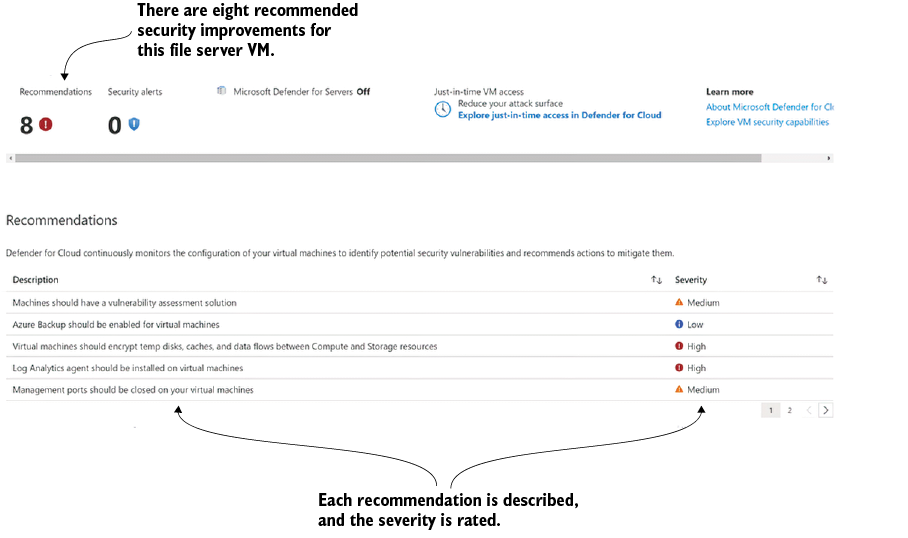
Use the figure to see how recommended security fixes are described and rated for severity. section 6.4.1
Recommendations work alongside Secure Score and security alerts. Secure Score helps prioritize improvements that add the most value, while alerts identify detected threats. Together, they turn security monitoring into a practical improvement queue rather than a mysterious cloud scolding. section 6.4 section 6.9

