A recovery model determines how SQL Server handles the transaction log, which backups are possible, and how precisely a database can be restored. The practical choice is not “always FULL”; it must match the database’s recovery requirements and workload. section 12.6
Choose and operate the models by their recovery consequences:
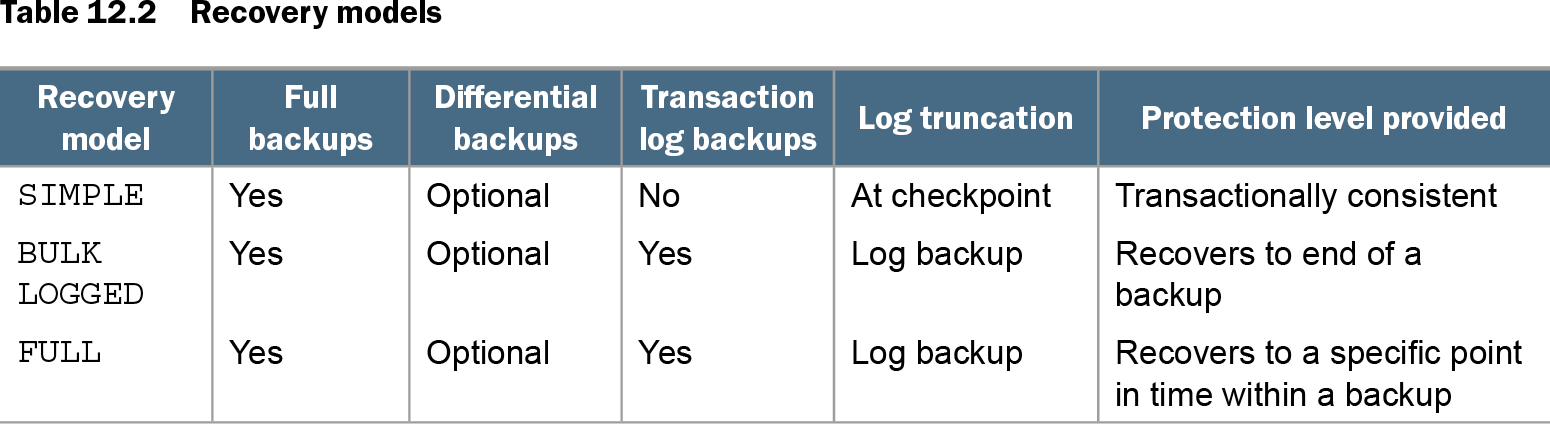
- SIMPLE permits full and optional differential backups, but not transaction-log backups. SQL Server truncates the log at checkpoints, and recovery is transactionally consistent rather than point-in-time. section 12.6
- FULL requires full and transaction-log backups. Log backups truncate the log and enable restoration to a specific point in time; omitting them allows the log to keep growing. section 12.6
- BULK_LOGGED is a temporary option for heavy bulk inserts or ETL work. It reduces logging and log I/O, but recovery can reach only the end of a log backup, not a point within it. section 9.4 section 12.6
- After changing SIMPLE to FULL, immediately take a full database backup. Until that backup initializes FULL recovery, scheduled log backups fail and the database cannot use that log-backup chain for recovery. section 12.8
PromotionDB: a safe promotion step
A preproduction database promoted at 2 p.m. may switch from SIMPLE to FULL while log backups are scheduled every 30 minutes. Those backups fail until a new full backup is taken, even if a full backup existed before the switch. Change the model, then take the full backup before relying on the log-backup schedule. section 12.8
Table 12.2 Recovery models (view table figure)
| Recovery model |
Full backups |
Differential backups |
Transaction log backups |
Log truncation |
Protection level provided |
|---|---|---|---|---|---|
| SIMPLE |
Yes |
Optional |
No |
At checkpoint |
Transactionally consistent |
| BULK LOGGED |
Yes |
Optional |
Yes |
Log backup |
Recovers to end of a backup |
| FULL |
Yes |
Optional |
Yes |
Log backup |
Recovers to a specific point in time within a backup |
Compare backup support, log truncation, and restore protection across SIMPLE, BULK_LOGGED, and FULL before selecting a model. section 12.6