The SIMPLE recovery model is a SQL Server database setting for workloads that do not need transaction log backups or point-in-time restore. Full backups are required for restore, and differential backups are optional. SQL Server truncates reusable transaction-log space at checkpoints, rather than through log backups. section 12.6
A common mistake is treating SIMPLE as the default for every database because log files have filled the disk or backup windows seem too constrained. That choice avoids transaction log backups, but it also removes the ability to restore to a specific point in time. For a production OLTP workload, a log-growth problem is usually a reason to investigate backup scheduling or a truncation hold-up, not automatically switch to SIMPLE. section 12.7 section 12.6
Use SIMPLE deliberately when its recovery limits fit the database:
- Plan restores from full backups, optionally supplemented by differential backups; do not expect transaction log backups to be available. section 12.6
- Recognize that checkpoint-driven truncation reuses log space, but does not provide a log-backup chain or point-in-time recovery. section 12.6
- Avoid choosing SIMPLE solely to suppress log growth in an OLTP database. Under FULL, regular transaction log backups truncate the log; persistent failures to truncate warrant investigation. section 12.7
- Consider write volume and availability requirements together. A data warehouse moved from SIMPLE to FULL for an availability group can incur substantially more I/O from fully logged transactions. section 13.4
Promotion trap: SIMPLE to FULL
Changing a preproduction database from SIMPLE to FULL and immediately scheduling log backups seems safe, especially if a prior full backup exists. It is not enough: the new FULL recovery model must be initialized with a new full database backup. Until that backup completes, transaction log backups fail and a restore cannot use the intended log-backup sequence. Make the full backup part of the recovery-model change, rather than waiting for the next scheduled full backup. section 12.8
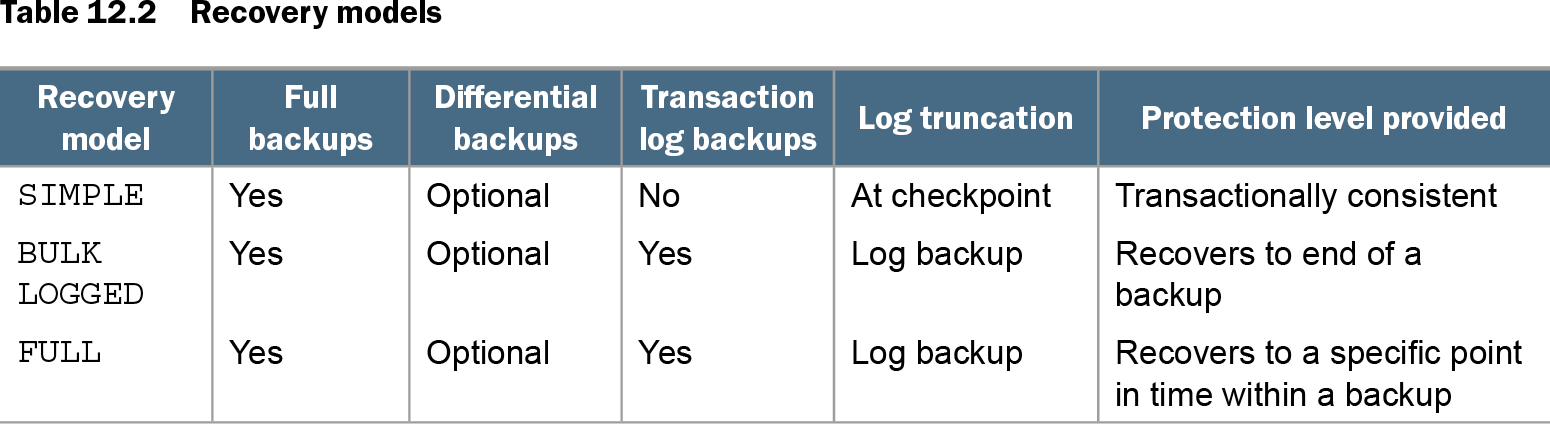
Table 12.2 Recovery models (view table figure)
| Recovery model |
Full backups |
Differential backups |
Transaction log backups |
Log truncation |
Protection level provided |
|---|---|---|---|---|---|
| SIMPLE |
Yes |
Optional |
No |
At checkpoint |
Transactionally consistent |
| BULK LOGGED |
Yes |
Optional |
Yes |
Log backup |
Recovers to end of a backup |
| FULL |
Yes |
Optional |
Yes |
Log backup |
Recovers to a specific point in time within a backup |
Compare backup options, log-truncation timing, and recovery protection across SIMPLE, BULK LOGGED, and FULL before selecting a model. section 12.6