A transaction log backup saves the transaction-log records generated since the previous log backup. During restore, those records are replayed after the required full backup, allowing recovery to a chosen point within a log backup. This makes log backups the part of a backup plan that limits data loss from mistakes such as unintended updates or deletes. section 12.1 section 12.6
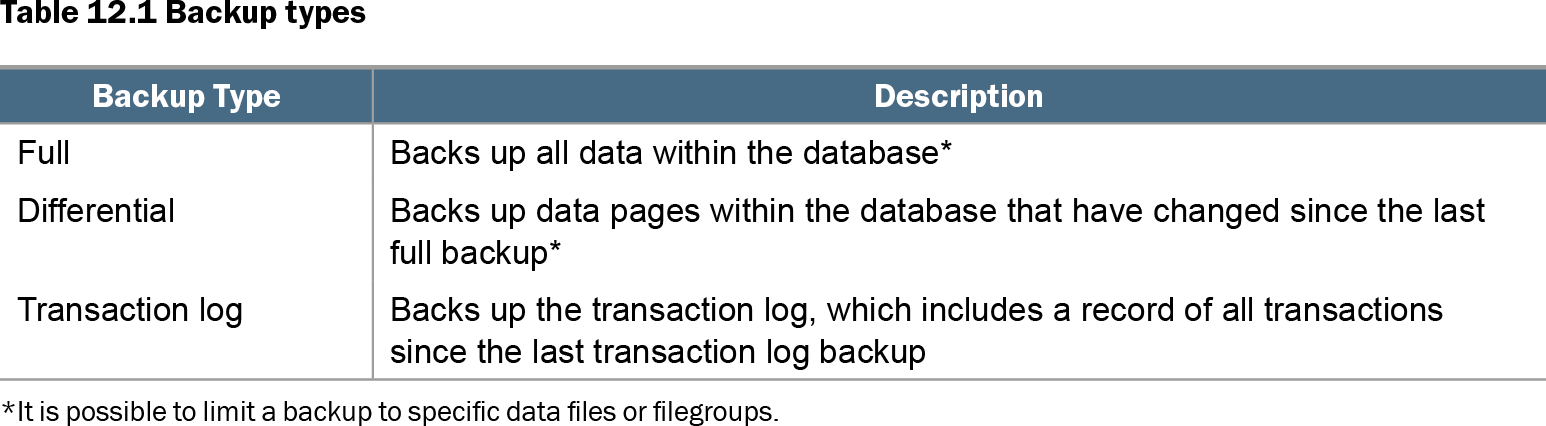
Table 12.1 Backup types (view table figure)
| Backup Type |
Description |
|---|---|
| Full |
Backs up all data within the database* |
| Differential |
Backs up data pages within the database that have changed since the last full backup* |
| Transaction log |
Backs up the transaction log, which includes a record of all transactions since the last transaction log backup |
| *It is possible to limit a backup to specific data files or filegroups. |
|
Compare full, differential, and transaction log backups: log backups capture transaction records rather than data pages changed in the database. section 12.1
Use transaction log backups as an operational recovery chain:
- Schedule them according to the recovery point objective (RPO). For a one-hour maximum acceptable data loss, take them hourly rather than only after a daily full backup. section 12.1 section 12.9
- Keep the full backup and every required log backup available. A log backup taken immediately after a full backup does not protect work performed later if the database storage fails. section 12.9
- In FULL recovery, run log backups regularly to truncate reusable log space. Without them, the log can continue growing until it consumes disk space. section 12.6
- Investigate a log that remains untruncated after a backup. Check for active transactions, backups or restores, snapshots, replication, or availability-replica delays. section 12.7
PromotionDB: changing from SIMPLE to FULL
Changing a promoted database from SIMPLE to FULL and merely scheduling BACKUP LOG is not enough. Take a new full backup immediately after the recovery-model change to initialize FULL recovery; otherwise log backups fail until a full backup exists. After that baseline, schedule log backups at the RPO interval. section 12.8 section 12.9
Choose the recovery model deliberately. SIMPLE does not permit transaction log backups and truncates the log at checkpoints. FULL permits point-in-time recovery but requires both a full-backup baseline and continuing log backups. BULK LOGGED permits log backups but does not provide point-in-time recovery. section 12.6