The full recovery model preserves transaction-log records until they are captured by transaction log backups. It supports restoring to a specific point in time within a backup, but it creates an operational obligation: take full backups and regular log backups. A checkpoint alone does not truncate the log under FULL; without log backups, the log can keep growing until it consumes available disk space. section 12.6
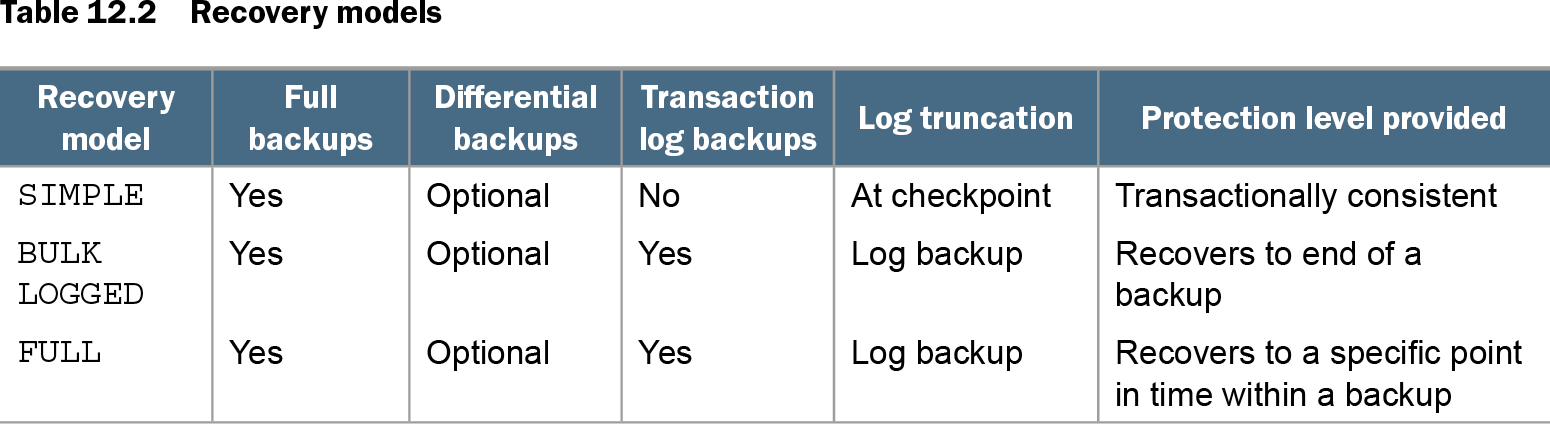
Table 12.2 Recovery models (view table figure)
| Recovery model |
Full backups |
Differential backups |
Transaction log backups |
Log truncation |
Protection level provided |
|---|---|---|---|---|---|
| SIMPLE |
Yes |
Optional |
No |
At checkpoint |
Transactionally consistent |
| BULK LOGGED |
Yes |
Optional |
Yes |
Log backup |
Recovers to end of a backup |
| FULL |
Yes |
Optional |
Yes |
Log backup |
Recovers to a specific point in time within a backup |
Compare FULL with SIMPLE and BULK LOGGED before choosing a recovery model: the trade-off is backup responsibility versus point-in-time recovery. section 12.6
Do not treat FULL as the default for every database, including every production database. Choose it from recovery requirements. It is appropriate when point-in-time restoration is needed and log-backup operations can be maintained; it is a poor fit when that protection is unnecessary but its backup and storage burden remains. section 12.6
Diagnose a log that will not truncate
A log backup normally drives truncation in FULL. If the log remains untruncated, inspect the database-level reuse-wait reason. Temporary conditions can include checkpoint timing, an active backup or restore, or snapshot creation. Repeated ACTIVE_TRANSACTION waits can point to long-running application transactions, while REPLICATION or AVAILABILITY_REPLICA waits indicate work applying on secondary databases. section 12.7
Use FULL safely with this operating checklist:
- Schedule full backups and transaction log backups; differential backups are optional. section 12.6
- Investigate a log that fails to truncate rather than switching to SIMPLE merely to control disk growth. section 12.7
- After changing from SIMPLE to FULL, immediately take a full database backup before expecting log backups to succeed. section 12.8
- Include that initializing full backup in the deployment process when promoting a database. section 12.8
PromotionDB: the missing initialization backup
Changing PromotionDB from SIMPLE to FULL and then running BACKUP LOG fails until a new full database backup has initialized FULL recovery. Until that backup occurs, scheduled log backups can fail and a restore may be unavailable during the gap. Change the model, take the full backup, then begin the log-backup chain. section 12.8
FULL also affects high-availability and disaster-recovery choices. Log shipping requires FULL because it ships and restores transaction-log backups. Availability groups likewise depend on the model, while a failover cluster for a high-write on-premises data warehouse may avoid the need for FULL because data is not synchronized between replicas. section 13.4