A relative CSS value gets its size from another size instead of staying fixed. It may follow the parent element, the root html element, the user's default text size, or the browser window. That makes layouts more forgiving when people enlarge text or switch between desktop and phone screens. section 7.6
The most useful relative units have different reference points:
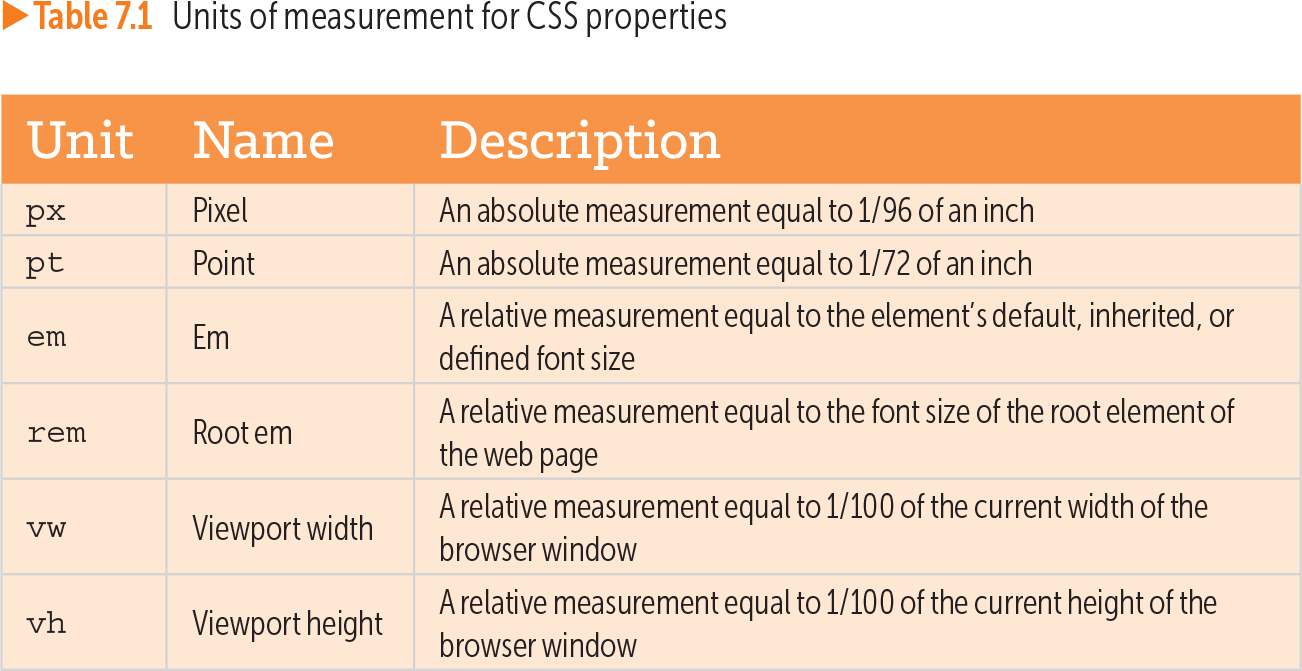
- em follows an element's default, inherited, or defined font size. Because font sizes inherit, nested em values can produce surprising results. section 7.6 section 14.9
- rem follows the font size of the root html element. If the root size is 16px, 1.5rem becomes 24px; if the user changes it to 20px, the same value becomes 30px. section 7.6
- Percentages usually follow the parent element's width, while vw and vh follow one percent of the browser window's width and height. section 7.6 section 14.11
Let a header grow with its text
A fixed height can crowd or clip a heading when the default font size increases. Replace it with a relative height: header { height: 4rem; } h1 { font-size: 2rem; } Now the header scales with the root text size instead of stubbornly remaining 64px tall. section 14.11
A practical starting pattern is rem for vertical spacing, percentages for ordinary horizontal sizing, rem for controlled width limits, vh for viewport-height effects, and vw for viewport-width effects. If percentage padding or margins behave oddly, rem provides more control. section 14.11
Table 7.1 Units of measurement for CSS properties (view table figure)
| Unit |
Name |
Description |
|---|---|---|
| px |
Pixel |
An absolute measurement equal to 1/96 of an inch |
| pt |
Point |
An absolute measurement equal to 1/72 of an inch |
| em |
Em |
A relative measurement equal to the element’s default, inherited, or defined font size |
| rem |
Root em |
A relative measurement equal to the font size of the root element of the web page |
| vw |
Viewport width |
A relative measurement equal to 1/100 of the current width of the browser window |
| vh |
Viewport height |
A relative measurement equal to 1/100 of the current height of the browser window |
Use the unit table to compare fixed measurements with em, rem, vw, and vh values at a glance. section 7.6