SSH remoting runs PowerShell commands and scripts on remote computers through Secure Shell Protocol. Native OpenSSH support begins with PowerShell 6, allowing connections among Windows, Linux, and macOS systems. It is suited to mixed or non-Active Directory environments where WSMan is not the right fit. section 5.4 section 5.8
A remote design separates the client, where connections begin, from servers, the devices being reached. Choose both a protocol and an execution context before adapting a script: remote machines need required modules, noninteractive commands, usable output formatting, and compatibility with their operating systems and PowerShell versions. section 5.1 section 5.2.1
Use SSH remoting with these constraints in mind:
- Authenticate with local accounts on remote servers; SSH does not support Active Directory domain authentication. section 5.4
- Accept the remote server’s configured default PowerShell version; SSH remoting cannot select or remotely configure that version. section 5.4
- Create sessions with New-PSSession using -HostName and -UserName, then use Invoke-Command and other session commands without changing them. section 5.4.4
- Avoid waiting on host-key or password prompts in automation. Configure the client .ssh/config to disable password authentication and require strict host-key checking, then record failures with try/catch. section 5.4.4
Protocol-aware extension inventory
To inventory VS Code extensions, search each user profile for .vsixmanifest files and return the discovered extensions. Keep the main script portable by selecting home paths with $IsLinux, $IsMacOS, or Windows defaults. A control script can test WSMan port 5985 first, then SSH port 22, and create the matching session rather than waiting for a failed connection attempt across every server. section 5.2.1 section 5.4.4
Figure 5.7 Control script for remote script execution with persistent connections using both WSMan and SSH protocols
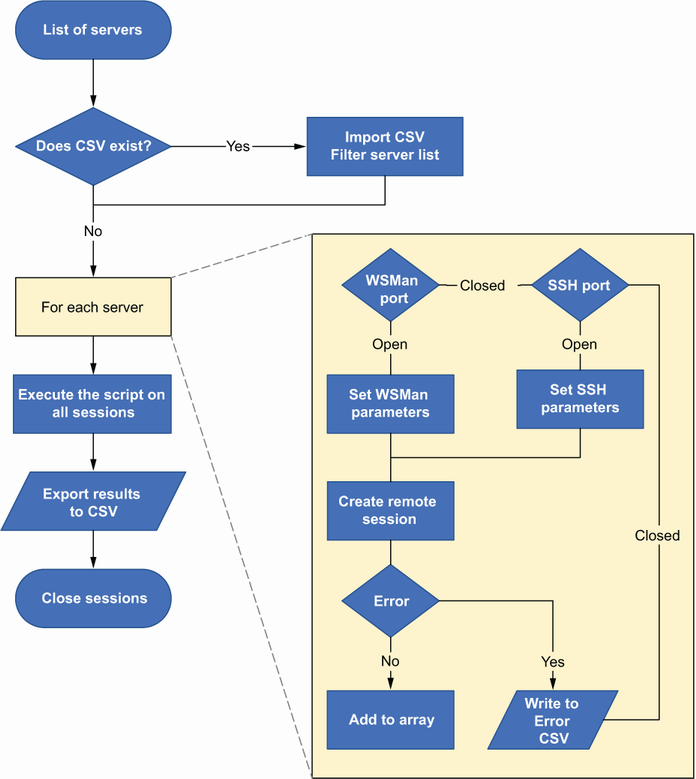
Follow the control-script flow for retaining sessions while selecting WSMan or SSH per server. section 5.4.4
Do not treat remoting as a one-off connection method. A reusable control script can apply a command across many servers, mix WSMan and SSH, preserve results, and log connection errors. This enables centrally managed changes even across Windows, Linux, cloud, and untrusted-network environments. section 5.4.4 section 5.7
Use caution on end-user devices. PowerShell remoting is disabled by default on Windows 10 and 11, and enabling remote execution there is discouraged for security and connectivity reasons; use a systems-management solution instead. section 11.4

