Repetition is consistency in visual design: reuse styles, shapes, colors, typography, and components so related parts feel unified. On a website, repeated patterns help people recognize what belongs together and orient themselves as they move between pages or sections. section 2.1.3 section 2.3
Consistency is not only decorative. When a familiar component looks and behaves the same way each time, users can identify its role more quickly. Reusing a component library also gives a growing site a cohesive look while avoiding unnecessary unique code, supporting scalability and reduced load time. section 2.1.3
Build repetition deliberately by reusing patterns that communicate the same purpose:
- Apply the same headline and body styles to comparable content, such as items in a blog list. section 2.1.3
- Use the same component and styling for equivalent listings so the page is easier to read and scan. section 2.1.3
- Repeat color and type treatments across digital and physical touchpoints to connect a brand experience. section 2.1.3
- Keep an action’s visual signal consistent; for example, use one button color for adding an item to a cart, while different treatments communicate unavailable states. section 2.1.3
From messy listings to a scannable page
A list can share button and description sizes yet still feel disconnected if its other styles vary. Repeat the same component structure and visual treatment for every hotel listing instead; the page becomes more readable and scannable because each item follows a recognizable pattern. section 2.1.3
Figure 2.27 The page instantly feels more readable and scannable when styles and components are repeated in the same manner for each hotel listing.
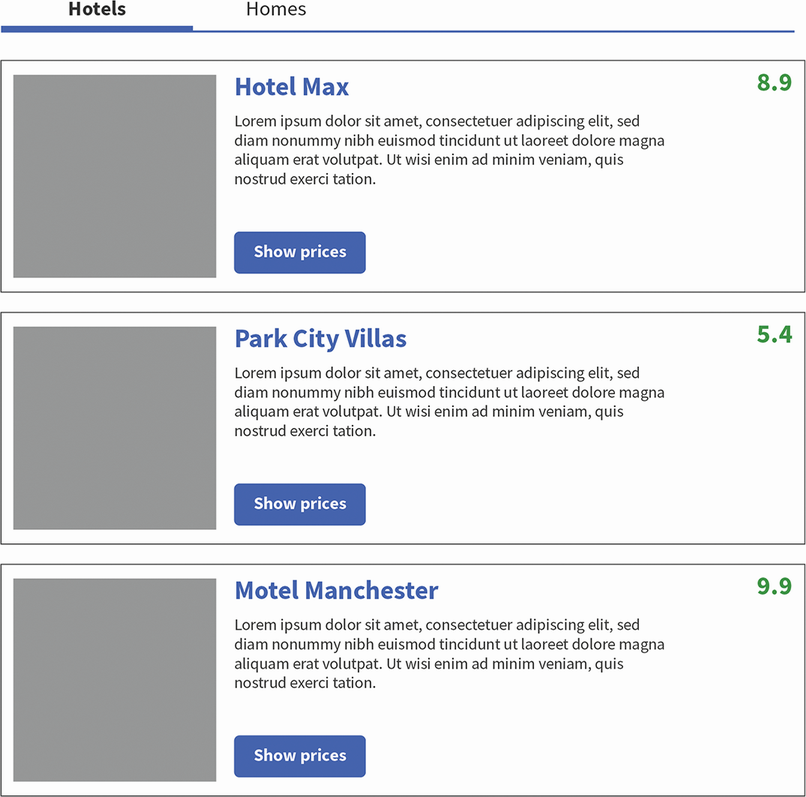
Compare repeated hotel-listing styles to see how a shared component pattern makes related content easier to scan. section 2.1.3
Repetition works alongside proximity, alignment, contrast, and balance rather than replacing them. Together, these principles establish relationships, hierarchy, and a layout that is easier to navigate and plan before wireframing or implementation. section 2.0 section 2.1 section 2.3

